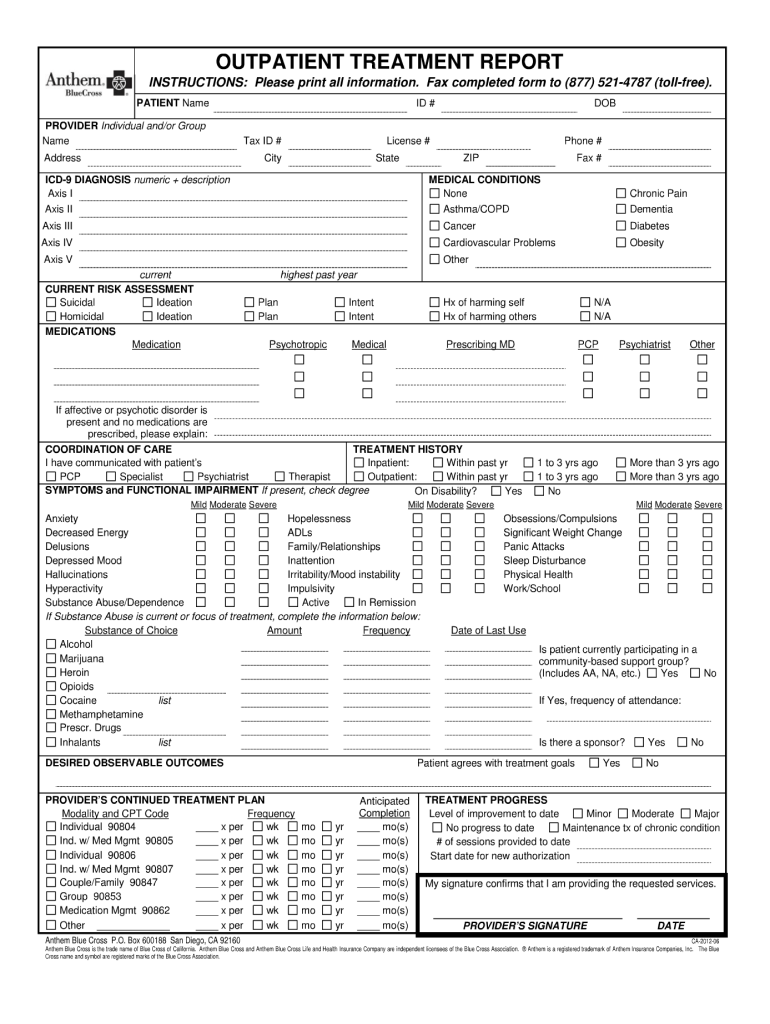
OUTPATIENT TREATMENT REPORT INSTRUCTIONS: Please print all information. Fax completed form to (877) 521-4787 (toll-free). PATIENT Name PROVIDER Individual and/or Group Name Address ICD-9 DIAGNOSIS.
Loading

Open form follow the instructions

Easily sign the form with your finger

Send filled & signed form or save
How to fill out the Anthem Outpatient Treatment Report online
Filling out the Anthem Outpatient Treatment Report online is an important step in ensuring that individuals receive the appropriate outpatient care they need. This guide provides clear and comprehensive instructions to help you complete the form accurately and efficiently.
Follow the steps to complete the Anthem Outpatient Treatment Report online
- Click ‘Get Form’ button to obtain the form and open it for editing.
- Start by entering the patient's personal information. This includes their full name, date of birth, and contact information. Ensure that all details are correct, as this will help in processing the report efficiently.
- Next, provide details about the treatment. Include the type of treatment received, the dates of service, and the name of the healthcare provider. Accurate documentation of this information is crucial for ongoing patient support.
- In the following section, describe the patient's current condition and progress. Use clear language and specific examples to illustrate the patient's treatment journey, as this will aid in the assessment of their ongoing care needs.
- Finally, review all entered information for accuracy. Once confirmed, you can save changes, download, print, or share the completed form as necessary.
Complete the Anthem Outpatient Treatment Report online today for efficient and effective documentation.
Experience a faster way to fill out and sign forms on the web. Access the most extensive library of templates available.
Related content
The MOUs with the county MHPs states that the. MHPs and the Plan agree to coordinate...
The Summary of Benefits and Coverage (SBC) document will help you choose a health plan...
Sep 24, 2015 — In addition, summary tables can specify care setting, such as inpatient...
Get answers to your most pressing questions about US Legal Forms API.
Is Anthem the same as Anthem Blue Cross?
Yes, Anthem is often synonymous with Anthem Blue Cross, especially in regions where Blue Cross branding is prevalent. This relationship helps streamline insurance processes, such as the submission of Anthem Outpatient Treatment Reports. Understanding this can help you navigate insurance claims more effectively.
What is the other name for Anthem insurance?
Anthem insurance is sometimes referred to as Anthem Blue Cross or simply Anthem. This nomenclature can vary depending on the state and specific product line. Being aware of these names is crucial, especially when dealing with documents like the Anthem Outpatient Treatment Report.
How do I speak to someone at BCBS of Illinois for providers?
To speak with someone at BCBS of Illinois, you can call the provider service number listed on the BCBS website or your provider handbook. They can assist with questions regarding claims and the Anthem Outpatient Treatment Report. Direct contact helps ensure you receive accurate information quickly.
What is the difference between Anthem and Blue Cross?
Anthem is a licensee of the Blue Cross Blue Shield Association, but offers its unique plans, services, and networks. While they share a common mission of providing healthcare coverage, Anthem’s offerings might differ from traditional Blue Cross plans. It's crucial for providers to understand these differences, especially when submitting an Anthem Outpatient Treatment Report.
What is the lawsuit against Anthem Blue Cross?
The lawsuit against Anthem Blue Cross generally pertains to claims related to reimbursement practices and potential overcharging. This litigation emphasizes the importance of submitting accurate Anthem Outpatient Treatment Reports to avoid similar issues. Keeping abreast of legal proceedings can help providers navigate their responsibilities more effectively.
Is Empire BlueCross BlueShield the same as Anthem?
Empire BlueCross BlueShield is an operating division of Anthem, so they work closely together but are distinct entities. They share resources, including the Anthem Outpatient Treatment Report functionality, which facilitates easier processing of claims. Understanding this relationship can simplify interactions for providers.
How do I contact Anthem provider line?
You can contact the Anthem provider line by locating the number on your provider handbook or the Anthem website. This line offers dedicated support for any inquiries related to claims, including the Anthem Outpatient Treatment Report submission. It's beneficial to have your provider number ready for quicker assistance.
What is Anthem called now?
Anthem operates under the brand Elevance Health for corporate purposes, but the Anthem name is still recognized in many states for insurance products. Therefore, when discussing services like the Anthem Outpatient Treatment Report, it is essential to be clear about which branding you are referring to. This duality ensures transparency in your communication.
How to get 1095-B form from Anthem PDF?
To obtain your 1095-B form from Anthem, log into your online account on the Anthem website. You will find a section related to tax forms where you can download the PDF. If you encounter any issues, customer service can guide you through the process. Having this form handy can facilitate your reporting of Anthem Outpatient Treatment.
How do I call Anthem provider line?
You can reach the Anthem provider line by dialing the specific number listed on the back of your Anthem member ID card. Alternatively, you can find this information on the Anthem website under the provider resources section. Speaking directly with a representative can help clarify any questions about submitting Anthem Outpatient Treatment Reports.
Use professional pre-built templates to fill in and sign documents online faster. Get access to thousands of forms.
If you believe that this page should be taken down, please follow our DMCA take down process here.
This form is available in several versions. Select the version you need from the drop-down list below.