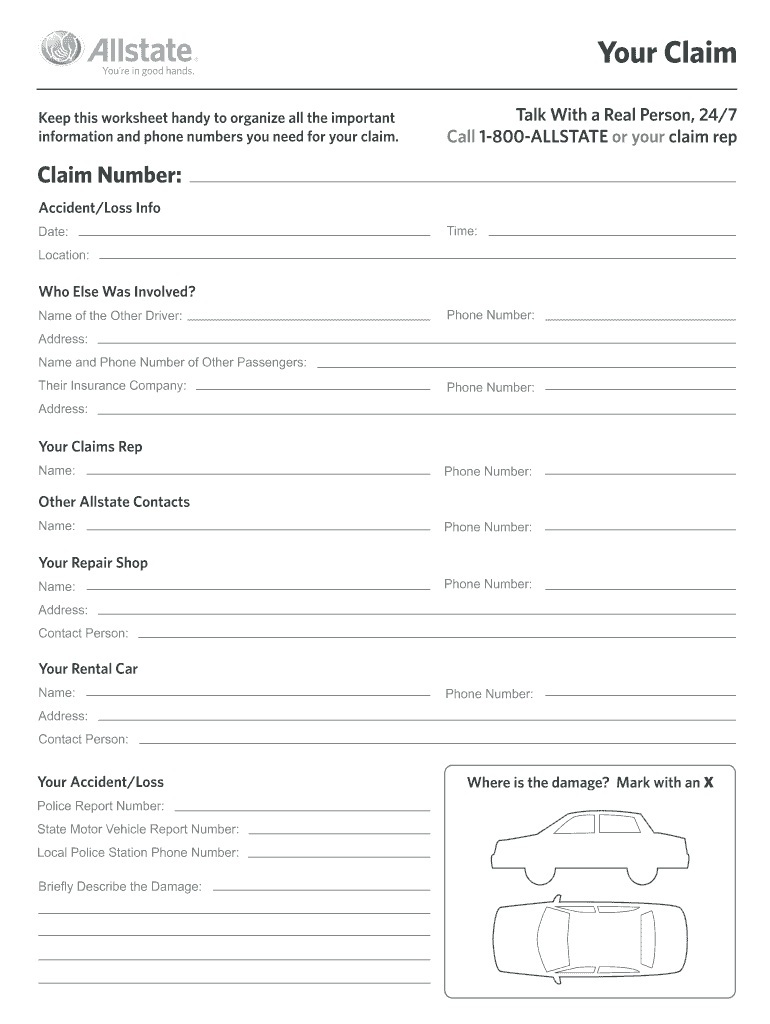
Aim. Talk With a Real Person, 24/7 Call 1-800-ALLSTATE or your claim rep Claim Number: Accident/Loss Info Date: Time: Location: Who Else Was Involved? Name of the Other Driver: Phone Number: Address: Name and Phone Number of Other Passengers: Their Insurance Company: Phone Number: Address: Your Claims Rep Name: Phone Number: Other Allstate Contacts Name: Phone Number: Your Repair Shop Name: Phone Number: Address: Contact Person: Your Rental Car Name: Phone Number: Address: Con.
Loading

Open form follow the instructions

Easily sign the form with your finger

Send filled & signed form or save
How to fill out the Allstate Your Claim online
Filing an insurance claim can be a straightforward process with the right guidance. This guide provides step-by-step instructions on how to effectively complete the Allstate Your Claim form online, ensuring you provide all necessary information.
Follow the steps to complete the form accurately.
- Press the ‘Get Form’ button to access the Allstate Your Claim document and open it in the form editor.
- Begin filling in your claim number, making sure it matches any previous communications you have received regarding your claim.
- Provide the accident or loss details by entering the date, time, and location where the incident occurred.
- List the other party involved in the incident by entering their name, phone number, and address. Also, include the names and phone numbers of any passengers with you during the incident.
- Specify the other party's insurance company by entering their name, phone number, and address.
- Fill in your claims representative's name and phone number to ensure quick communication regarding your claim.
- Provide the contact details of any other Allstate representatives you may need to reach.
- Enter the name, phone number, and address of your repair shop. Include a contact person's name if applicable.
- If rental car services are involved, fill in the name, phone number, and address of your rental car provider along with a contact person's name.
- Include pertinent details regarding your accident or loss, such as the police report number, state motor vehicle report number, and the phone number for your local police station.
- Provide a brief description of the damage incurred during the incident, ensuring clarity and conciseness.
- Lastly, mark the area of damage on the provided diagram with an 'X' for easy reference.
- Once all sections are complete, save your changes, and use the options to download, print, or share the form as needed.
Submit your claim online today to get the assistance you need.
Experience a faster way to fill out and sign forms on the web. Access the most extensive library of templates available.
Related content
You may fax your claim to us at 1-866-424-8482. Please be assured that your claim will...
File a claim with Allstate easily, understanding the claims process and requirements...
We guarantee a service appointment will be available within 3 days of your approved claim...
Get answers to your most pressing questions about US Legal Forms API.
How long does it take for Allstate to approve a claim?
The time it takes for Allstate to approve a claim can vary based on the complexity of the situation. Generally, you can expect a response within a few days if all necessary information is provided at the start. Allstate aims to process claims efficiently, and you can track your claim status through the 'Your Claim' feature. If you have questions during this time, customer support is available to assist you.
How do I file an insurance claim with Allstate?
To file an insurance claim with Allstate, you need to access the 'Your Claim' feature either through the website or the mobile app. Provide your policy details and incident information when prompted. Make sure to include any evidence, such as photos or reports, to support your claim. Once submitted, you will receive updates on its status directly through your preferred communication method.
What not to say when filing a claim?
When filing a claim, avoid making assumptions about fault or admitting liability. Also, refrain from speaking negatively about your situation, as this can impact the claims process. Keep your statements factual and concise, focusing on the details of the incident. Remember, accurate information will facilitate a smoother claims experience with Allstate.
How do I file my own insurance claim?
Filing your own insurance claim with Allstate is straightforward. Begin by collecting relevant documents that will support your claim. After gathering your information, go to the Allstate website or app and select the 'Your Claim' option. Complete the online form, providing all required details, and submit it for processing.
Can you file a claim against your own insurance?
Yes, you can file a claim against your own insurance with Allstate. This is common in situations where you experience damage, such as an accident or natural disaster. When you file a claim, you may use your own policy to cover costs, depending on your coverage type. It’s important to review your policy details to understand your options.
How to file your own insurance claim?
To file your own insurance claim, start by gathering all necessary documents, such as your policy information, incident details, and any supporting evidence. Next, visit the Allstate website or mobile app, where you can navigate to the 'Your Claim' section. Follow the prompts to enter your information, and submit your claim. Remember, submitting accurate information will help expedite the claims process.
How do I report a car accident to Allstate?
To report a car accident, contact Allstate immediately after ensuring safety at the scene. You can report the accident through the Allstate website, mobile app, or by calling their claims department. By using Allstate Your Claim, you initiate a clear pathway to getting your situation resolved and stress alleviated.
How do I submit a claim to Allstate?
You can submit a claim to Allstate easily through their website, mobile app, or by calling their claims hotline. Provide detailed information about the incident, including any supporting documents or photos. Utilizing Allstate Your Claim ensures that you have a streamlined process from submission to resolution.
How to check Allstate claim status?
To check your Allstate claim status, log into your account on the Allstate website or mobile app. Once logged in, navigate to the claims section where you can view current updates and details regarding your claim. This real-time information keeps you informed and empowered while using Allstate Your Claim.
What to do after a car accident in Allstate?
After a car accident, the first step is to ensure everyone's safety and then call the authorities if necessary. Exchange information with other drivers and gather details about the accident. Once you have the information, contact Allstate to initiate your claim process; this is where Allstate Your Claim can help you navigate your next steps seamlessly.
Use professional pre-built templates to fill in and sign documents online faster. Get access to thousands of forms.
If you believe that this page should be taken down, please follow our DMCA take down process here.