Loading
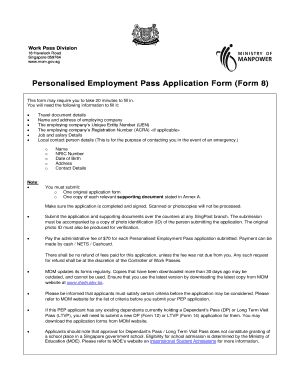
Get Personalised Employment Pass Application Form (form 8)
How it works
-

Open form follow the instructions
-

Easily sign the form with your finger
-

Send filled & signed form or save
How to fill out the Personalised Employment Pass Application Form (Form 8) online
Filling out the Personalised Employment Pass Application Form (Form 8) online can be a straightforward process when you have a clear understanding of each section. This guide will provide user-friendly, step-by-step instructions to help you complete the form accurately and efficiently.
Follow the steps to complete your application form successfully.
- Click the ‘Get Form’ button to obtain the form and open it in your preferred digital environment.
- Begin with Part 1, section 1A: Provide your personal particulars, including your Foreign Identification Number (FIN) if applicable, your name as shown on your travel document, and your residential address. Make sure to include a local mailing address if you are not currently in Singapore.
- In section 1A, fill in your travel document information: type of document, country of issue, document number, and dates of issue and expiry. Remember to provide at least one contact number and your email address.
- Proceed to section 1B: Complete additional personal information. This includes your sex, marital status, date of birth, nationality, race, and religion. Fill in your education details by providing the highest qualification and relevant information about the awarding body.
- Continue with Part 2: In section 2A, provide details of your present or new employment if you have found a position in Singapore. Include your occupation, salary details, and information about the employing company, including the Unique Entity Number (UEN) and registration number.
- If you are not currently a Work Pass holder, fill out section 2B with your last employment details if applicable. Include your previous occupation, job description, and employment dates.
- In Part 3, list details of your local contact person who is a Singapore Citizen or Permanent Resident. Provide their name, date of birth, NRIC number, and contact information.
- In Part 4, carefully answer the antecedents questions regarding your history of entry into countries, convictions, and prior residency status in Singapore. Provide further details if you answer 'yes' to any of the questions.
- Finally, in Part 5, sign and declare the accuracy of the information provided in the form. Your signature confirms your consent for information verification by the government.
- Ensure that you have included all required supporting documents as listed in Annex A. Once completed, save your changes, and prepare for submission over the counter at a SingPost branch.
Complete your Personalised Employment Pass Application Form online today to streamline your application process.
If the SAT shows that the candidate is not eligible, you shouldn't apply for the Employment Pass because it will be rejected. If the SAT shows that the candidate is eligible, there is around a 90% chance that the candidate will get a pass.
Industry-leading security and compliance
US Legal Forms protects your data by complying with industry-specific security standards.
-
In businnes since 199725+ years providing professional legal documents.
-
Accredited businessGuarantees that a business meets BBB accreditation standards in the US and Canada.
-
Secured by BraintreeValidated Level 1 PCI DSS compliant payment gateway that accepts most major credit and debit card brands from across the globe.