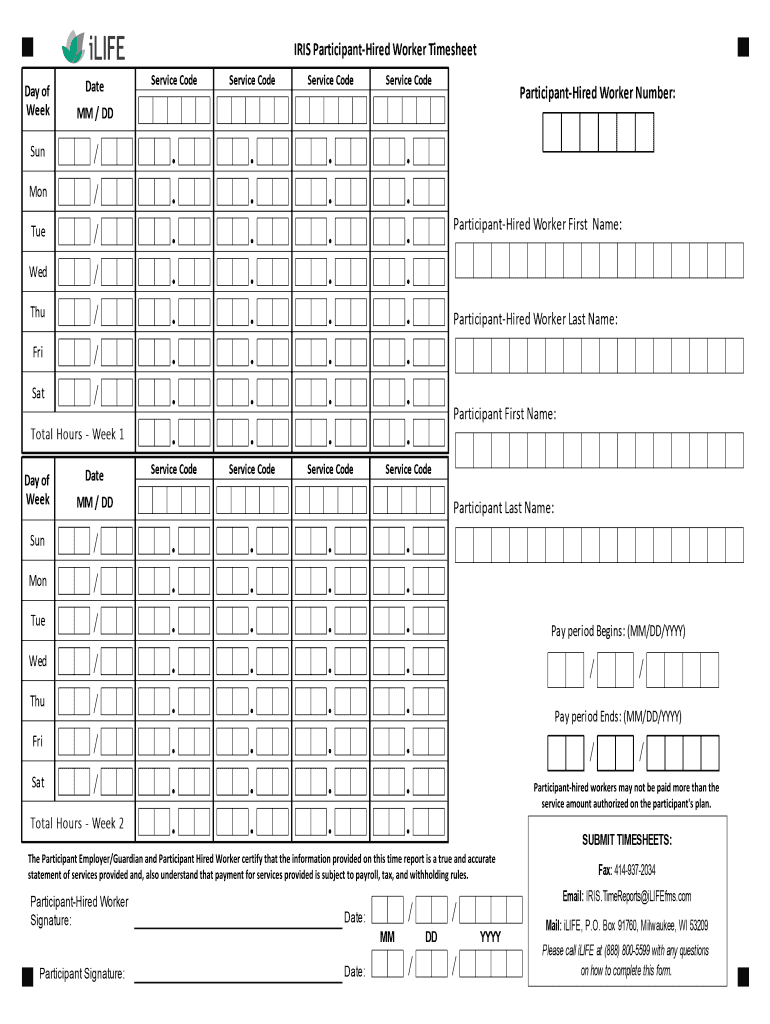
Participanthired workers may not be paid more than the service amount authorized on the participant's plan.The Participant Employer/Guardian and Participant Hired Worker certify that the information.
Loading

Open form follow the instructions

Easily sign the form with your finger

Send filled & signed form or save
How to fill out the iLIFE IRIS Participant-Hired Worker Time Sheet online
Filling out the iLIFE IRIS Participant-Hired Worker Time Sheet accurately is essential for ensuring proper payment for services rendered. This guide provides clear instructions to help users complete the form online with confidence.
Follow the steps to accurately complete the form online.
- Select the ‘Get Form’ button to retrieve the iLIFE IRIS Participant-Hired Worker Time Sheet and open it for editing.
- In the time reporting area on the left side of the form, enter the following: a. In the Date column, record the dates for each day within the pay period. b. For each service provided, write the appropriate service code abbreviation in the Service Code columns. c. For each day worked, note the total hours worked for each service under the relevant Service Code column. d. At the bottom of this section, in the Total Hours row, summarize the total hours worked for each Service Code.
- On the right side of the form in the worker/participant information area, ensure that you fill out all requested information.
- At the bottom of the timesheet, both the participant-hired worker and the participant must sign and date the document.
- Finally, submit the completed timesheet to iLIFE by the specified due date.
Complete your iLIFE IRIS Participant-Hired Worker Time Sheet online today for prompt payment.
Experience a faster way to fill out and sign forms on the web. Access the most extensive library of templates available.
Related content
hired workers. •. Answer worker questions about EVV. •. Answer payroll and ... Email:...
IRIS Participant Hired Worker Timesheet. iLIFE processed the timesheet must include the...
Get answers to your most pressing questions about US Legal Forms API.
How do you record time on a time sheet?
To record time on a timesheet, access the iLIFE portal and locate the timesheet section. Enter your hours worked for each day, including breaks if applicable. By keeping your records updated regularly, you ensure that your iLIFE IRIS Participant-Hired Worker Time Sheet is accurate and reflects your true working hours.
How to write hours on a timesheet?
Writing hours on a timesheet in the iLIFE system involves recording both the total hours and any partial hours worked. Use decimals for partial hours, such as 0.5 for half an hour. This method helps you maintain an accurate iLIFE IRIS Participant-Hired Worker Time Sheet that reflects your actual work.
How to write 7 hours and 45 minutes on a timesheet?
When documenting 7 hours and 45 minutes on your timesheet, you would typically input '7.75 hours' in the iLIFE IRIS system. This decimal format makes it easier for calculations and records. Consistent formatting will ensure clarity and precision in your time reporting.
How do I fill my timesheet hours?
Filling out your timesheet hours in the iLIFE system requires you to indicate the total hours worked for each day. Be specific about your start and end times, and make sure to check if you need to include breaks. This precision enhances the accuracy of your iLIFE IRIS Participant-Hired Worker Time Sheet.
How do I enter a timesheet?
To enter a timesheet, start by logging into the iLIFE portal and selecting 'New Timesheet' in the dashboard. Follow the prompts to input your hours, activities, and any relevant notes. This process helps in maintaining accurate records for your iLIFE IRIS Participant-Hired Worker Time Sheet.
How do I record a timesheet?
Recording a timesheet in the iLIFE IRIS system is straightforward. First, log in to the iLIFE portal and navigate to the timesheet section. From there, select the appropriate date range and fill in your hours worked, ensuring that you save your entries regularly to avoid losing any data.
What is the number for the iLIFE portal?
To access your iLIFE IRIS Participant-Hired Worker Time Sheet, you can contact the iLIFE support team at their dedicated phone number. They are available to assist you with any questions regarding the portal and your timesheets. Having the correct information will ensure you receive the support you need quickly.
What is the company ID for Iris iLIFE?
The company ID for Iris iLIFE can vary depending on your specific participant account. If you're unsure of your ID, you can find it by contacting customer support to assist you with the iLIFE IRIS Participant-Hired Worker Time Sheet. They will provide you with the correct information quickly.
What is the phone number for Iris USA customer service?
You can reach Iris USA customer service at 1-800-123-4567. Their dedicated team is available to assist you with inquiries about the iLIFE IRIS Participant-Hired Worker Time Sheet and other related services. Don't hesitate to call if you need guidance or have questions.
How do I fill out the timesheet?
To fill out the iLIFE IRIS Participant-Hired Worker Time Sheet, start by entering your personal information at the top. Next, accurately record the hours worked each day in the designated sections. Be sure to double-check your entries for accuracy before submitting it for approval to ensure timely processing.
Use professional pre-built templates to fill in and sign documents online faster. Get access to thousands of forms.
If you believe that this page should be taken down, please follow our DMCA take down process here.