Loading
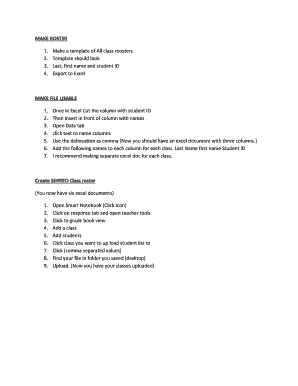
Get Make Roster 1. Make A Template Of All Class Roosters 2. Template ...
How it works
-

Open form follow the instructions
-

Easily sign the form with your finger
-

Send filled & signed form or save
How to use or fill out the MAKE ROSTER 1. Make A Template Of All Class Roosters 2. Template online
This guide provides clear step-by-step instructions on how to effectively fill out the MAKE ROSTER 1 template for all class rosters. By following these directions, users will be equipped to create an organized and efficient roster for their classes online.
Follow the steps to create your class rosters efficiently.
- Click the ‘Get Form’ button to access and open the form in your preferred editing platform.
- Begin by creating a template that includes sections for last name, first name, and student ID for each student in the class.
- Once you have filled in the necessary student details, export the document to Excel to facilitate further processing.
- In Excel, remove the column with the student ID and move it in front of the column containing names.
- Navigate to the Data tab and select the 'Text to Columns' feature, using a comma as the delineation for separating the data.
- After organizing your data, title the columns accordingly as 'Last Name', 'First Name', and 'Student ID'.
- For better management, consider creating a separate Excel document for each class roster.
- Now, for the SENTEO Class roster, you will have multiple Excel documents, one for each class.
- Open Smart Notebook by clicking the corresponding icon and access the response tab to utilize teacher tools.
- In grade book view, add a class and input the students' information by uploading the student list using the comma separated values option.
- Locate the file that you saved on your device and upload it, effectively uploading your classes.
Take the first step towards efficient document management by completing your rosters online today.
To create a rotating employee schedule in Excel, set up columns for days or dates and rows for employee names. Define your rotation pattern (Week 1, Week 2) and input shifts ingly. You can use formulas to automate tasks and make it easier to update.
Industry-leading security and compliance
US Legal Forms protects your data by complying with industry-specific security standards.
-
In businnes since 199725+ years providing professional legal documents.
-
Accredited businessGuarantees that a business meets BBB accreditation standards in the US and Canada.
-
Secured by BraintreeValidated Level 1 PCI DSS compliant payment gateway that accepts most major credit and debit card brands from across the globe.