Loading
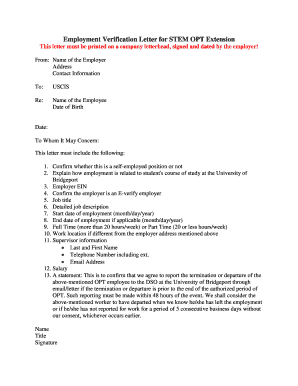
Get Employment Verification Letter For Stem Opt Extension
How it works
-

Open form follow the instructions
-

Easily sign the form with your finger
-

Send filled & signed form or save
How to fill out the Employment Verification Letter for Stem Opt Extension online
The Employment Verification Letter for Stem Opt Extension is a critical document required for international students seeking to extend their practical training. This guide will provide you with a step-by-step approach to filling out the form online, ensuring you include all necessary details.
Follow the steps to accurately complete your employment verification letter.
- Click ‘Get Form’ button to obtain the form and open it in the editor.
- Begin by entering the employer's name at the top of the letter, ensuring it matches the official company name.
- Input the company's address, including city, state, and zip code, formatted correctly.
- Provide contact information for the employer, including a phone number and email address where they can be reached.
- Address the letter to USCIS and include a subject line indicating the purpose of the letter.
- Fill in the employee's name and date of birth in the designated sections.
- Include the date of writing the letter to ensure accuracy and relevance.
- In the main body, confirm whether the position is self-employed or not.
- Explain how the employment relates to the student’s course of study at the University of Bridgeport.
- Enter the employer's Employer Identification Number (EIN) in the specified field.
- State that the employer is an E-Verify employer.
- Specify the job title of the employee clearly.
- Provide a detailed job description that outlines the employee's responsibilities.
- Indicate the start date of employment using the month/day/year format.
- If applicable, include the end date of employment in the same format.
- Clarify the employment status as Full Time (more than 20 hours/week) or Part Time (20 or less hours/week).
- If the work location differs from the employer's address, include it here.
- Provide supervisor information, including their full name, telephone number (with extension), and email address.
- List the employee's salary as accurately as possible.
- Add a statement agreeing to report any termination or departure of the employee to the DSO at the University of Bridgeport within 48 hours.
- Finish the letter with the name and title of the signer, followed by their signature.
- Once all sections are filled out, save your changes, download, print, or share the completed document as necessary.
Complete your Employment Verification Letter online today to ensure a smooth application process for your Stem Opt Extension.
You must submit at least two self-evaluations signed by your employer during the 24-Month STEM OPT Extension. Complete the evaluation on page 5 of your most recent Form I-983 and email the whole document to your STEM Advisor. ... A 6-Month STEM Validation is also due with each annual evaluation; see above instructions.
Industry-leading security and compliance
US Legal Forms protects your data by complying with industry-specific security standards.
-
In businnes since 199725+ years providing professional legal documents.
-
Accredited businessGuarantees that a business meets BBB accreditation standards in the US and Canada.
-
Secured by BraintreeValidated Level 1 PCI DSS compliant payment gateway that accepts most major credit and debit card brands from across the globe.