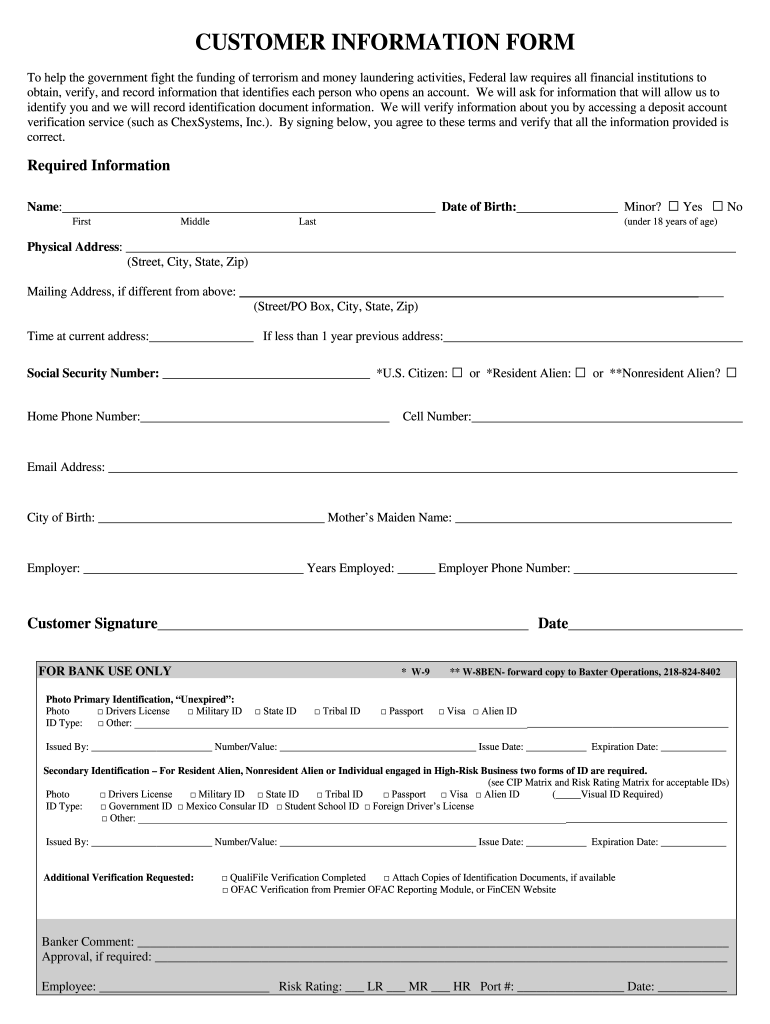
that identifies each person who opens an account. We will ask for information that will allow us to identify you and we will record identification document information. We will verify information about you by accessing a deposit account verification service (such as ChexSystems, Inc.). By signing below, you agree to these terms and verify that all the information provided is correct. Required Information Name: Date of Birth: First Middle Minor? Last □ Yes □ No (under 18 years of age).
Loading

Open form follow the instructions

Easily sign the form with your finger

Send filled & signed form or save
How to fill out the RiverWood Bank Customer Information Form online
Filling out the RiverWood Bank Customer Information Form online is a straightforward process designed to gather essential information for account setup. This guide provides detailed instructions to ensure that you complete the form accurately and efficiently.
Follow the steps to successfully complete your customer information form.
- Click ‘Get Form’ button to obtain the RiverWood Bank Customer Information Form and open it in the editor.
- Begin filling in your personal information. Start with your full name, including first, middle, and last name. If you are a minor (under 18 years of age), check the appropriate box.
- Provide your physical address, including the street, city, state, and zip code. If your mailing address differs from your physical address, include that information as well.
- Indicate the amount of time you have lived at your current address. If you have lived there for less than a year, provide your previous address.
- Enter your Social Security number. Select your citizenship status by checking the applicable box: U.S. Citizen, Resident Alien, or Nonresident Alien.
- Fill in your home phone number, cell number, and email address for contact purposes.
- Provide your city of birth and your mother's maiden name for identification verification.
- Enter the name of your employer, years employed, and the employer's phone number.
- Sign the form to verify that all information provided is accurate and agree to the terms outlined in the document.
- In the identification section, select a primary form of photo identification from the list provided and fill in the necessary details, including ID type and issue-related information.
- If applicable, provide a secondary form of identification as required for Resident Aliens or Nonresident Aliens. Include the necessary details as outlined.
- Complete any additional verification requested and attach copies of identification documents if you have them available.
- Review the form for accuracy and make sure all fields are filled out correctly before proceeding to submission options.
- Finally, you can save changes, download, print, or share the completed form as needed.
Complete your RiverWood Bank Customer Information Form online today for a smooth account setup experience.
Experience a faster way to fill out and sign forms on the web. Access the most extensive library of templates available.
Related content
Transaction Form: Branch Establishment - Staffed Branch. Bank: Riverwood Bank...
Dec 31, 2012 — Except as expressly incorporated by reference, the registrant's proxy...
Get answers to your most pressing questions about US Legal Forms API.
What does a customer file contain?
A customer file contains essential information such as identification data, account details, transaction records, and any correspondence with the bank. These elements work together to create a complete profile of the customer, which helps the bank serve you better. When you fill out the RiverWood Bank Customer Information Form, you enable the creation of this customer file, ensuring that the bank has what it needs to assist you. Overall, a well-maintained customer file is vital for a smooth banking experience.
What is a customer data file?
A customer data file refers to a collection of all information related to a banking customer. This file typically encompasses contact details, transaction history, and account preferences. By completing the RiverWood Bank Customer Information Form, you contribute to building your customer data file, which allows the bank to understand your needs better. Thus, having a comprehensive customer data file is essential for offering tailored banking solutions.
What is the customer information file in banking?
The customer information file in banking is a digital repository that stores all relevant details about a customer, including their personal information and account history. This file is crucial for maintaining secure banking practices and ensuring compliance with regulations. When using the RiverWood Bank Customer Information Form, you help create this file, which supports the bank in offering you personalized services. A well-maintained customer information file enhances your banking experience significantly.
What is an example of customer information?
Customer information includes details such as name, address, contact number, and social security number. When filling out the RiverWood Bank Customer Information Form, you provide these essential details to help facilitate your banking experience. This information helps the bank verify your identity and manage your account effectively. Therefore, it’s important to provide accurate customer information.
Which bank routing number is 054001725?
The routing number 054001725 is associated with a different bank, not RiverWood Bank. If you are unsure about the routing number you need, it’s always a good idea to verify it on your bank’s official website or contact customer service. For seamless banking, make sure to use the correct routing number when filling out the RiverWood Bank Customer Information Form.
What is the customer information of a bank?
Customer information of a bank includes details such as account numbers, transaction history, and personal identification. This information is necessary for managing your account and ensuring secure banking services. Utilizing the RiverWood Bank Customer Information Form allows you to easily provide and update your customer information, streamlining your banking experience.
What is the routing number for RiverWood Bank?
The routing number for RiverWood Bank is 054000030. It is crucial for facilitating various banking transactions, including automated payments and wire transfers. When completing the RiverWood Bank Customer Information Form, use this routing number to ensure smooth processing of your requests and transactions.
What bank is this routing number 054000030?
The routing number 054000030 belongs to RiverWood Bank. This number is essential for identifying the bank during transactions such as direct deposits and electronic fund transfers. When filling out the RiverWood Bank Customer Information Form, this routing number ensures your financial activities are processed accurately and securely.
What industry does RiverWood Bank belongs to?
Answer. RiverWood Bank's routing number is 291271240.
What is RiverWood Bank email domain?
RiverWood is an employee-owned community bank, serving local customers through personal relationships. We make decisions locally to help our customers and businesses flourish and achieve financial success. Employee-Owners Working For You!
Use professional pre-built templates to fill in and sign documents online faster. Get access to thousands of forms.
If you believe that this page should be taken down, please follow our DMCA take down process here.