Loading
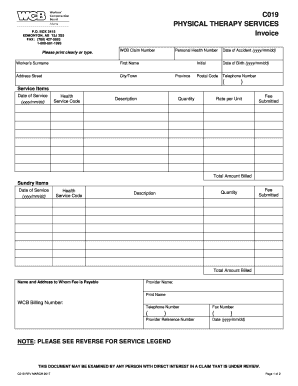
Get Physical Therapy Invoice
How it works
-

Open form follow the instructions
-

Easily sign the form with your finger
-

Send filled & signed form or save
How to fill out the Physical Therapy Invoice online
Filling out a Physical Therapy Invoice is a crucial step in ensuring that all services rendered are accurately billed and reimbursed. This guide provides clear, step-by-step instructions to help users complete the invoice online with confidence.
Follow the steps to accurately complete your invoice online.
- Click ‘Get Form’ button to obtain the invoice and open it in your preferred online editor.
- Fill in the WCB claim number associated with the patient to ensure accurate processing.
- Enter the patient's surname and first name in the designated fields clearly.
- Provide the complete address, including street, city/town, province, and postal code.
- Input the personal health number and date of accident in the required format (yyyy/mm/dd).
- Document the patient's initials and date of birth in the specified fields.
- Include a telephone number where the patient can be reached.
- For each service item, complete the fields for date of service, health service code, description, quantity, rate per unit, fee submitted, and total amount billed.
- If applicable, add any sundry items, making sure to fill out date of service, health service code, quantity, description, fee submitted, and total amount billed.
- Indicate the name and address to whom the fee is payable, including the provider's name, WCB billing number, telephone number, and fax number.
- Fill in the provider reference number and the date.
- Review all entries for accuracy, then save your changes, download the document, print it, or share it as needed.
Complete your Physical Therapy Invoice online today to ensure timely processing of your services.
Add your client's contact details, including the client's name, address, email address and phone number. Create a unique invoice number and include the invoice date and payment due date. Include an itemized list of the services you provided with brief descriptions of each service. Add your rates for each service ...