Loading
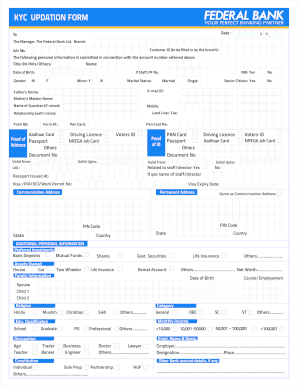
Get Federal Bank Kyc Updation
How it works
-

Open form follow the instructions
-

Easily sign the form with your finger
-

Send filled & signed form or save
How to fill out the Federal Bank KYC Updation online
This guide provides clear and professional instructions on completing the Federal Bank KYC Updation form online. By following these steps, you can ensure that your personal information is accurately submitted for verification.
Follow the steps to complete the KYC updation form effectively.
- Press the ‘Get Form’ button to access the KYC updation form. Ensure you have the necessary documents prepared before you begin the process.
- Fill in the date at the top of the form in the format D D M M Y Y. This is essential for record-keeping.
- Address the form to 'The Manager, The Federal Bank Ltd. Branch'. Make sure to specify the correct branch name where your account is held.
- Provide your Customer ID, which will be filled in by the branch. Also include your Account Number to link your details accurately.
- Complete the personal information section, including your title (Mr, Mrs, Others), full name, date of birth, and gender. If applicable, indicate your Employee ID.
- Specify your marital status and whether you are a senior citizen or an NRI. Tick the appropriate boxes as applicable.
- Input your email ID, and contact numbers, such as mobile and landline/fax. This information is crucial for communication.
- If you are a minor, fill in details of your guardian, including their name and relationship.
- Enter your PAN card details and Aadhaar card information. Ensure that you provide accurate numbers as these are required for identity verification.
- In the additional personal information section, indicate your employer, designation, and any other bank account details if applicable.
- Review the instructions provided for completing each section of the form. Ensure you are using black ink and BLOCK LETTERS, and tick boxes where needed.
- Attach any required documents that support your application, such as identity and address proofs, as described in the instructions.
- Finally, sign the declaration stating that the information provided is true and accurate to the best of your knowledge and belief.
- Once all fields are complete, save any changes made to your form. You can then choose to download, print, or share the form as needed.
Complete your KYC updation form online today to ensure your banking information is up-to-date.
Filling out a KYC form requires careful attention to detail. Start by entering your name, address, and contact information as per the guidelines on the form. Verify that all submitted documents are accurate for a successful Federal Bank KYC Updation.