Loading
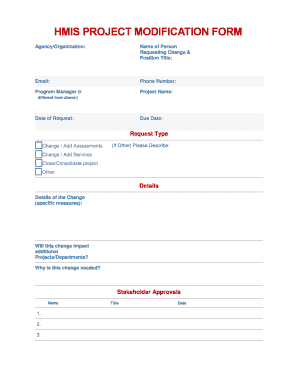
Get Hmis Project Modification Form - Havenforhope
How it works
-

Open form follow the instructions
-

Easily sign the form with your finger
-

Send filled & signed form or save
How to fill out the HMIS PROJECT MODIFICATION FORM - Havenforhope online
Filling out the HMIS Project Modification Form is an essential process for those seeking to implement changes in their programs. This guide provides clear, step-by-step instructions to help you complete the form accurately and efficiently.
Follow the steps to successfully complete the form.
- Click ‘Get Form’ button to obtain the form and open it in the editor.
- Begin by entering the name of the agency or organization in the designated field. This helps to identify the entity requesting the modification.
- In the next section, provide the name of the person requesting the change along with their position title. Ensure that the contact details, including email and phone number, are accurate for future correspondence.
- If the program manager is different from the requester, fill in their name. This section is crucial for communication purposes regarding the project.
- State the project name clearly in the corresponding field. This helps in identifying the specific project associated with the modification request.
- Fill in the date of the request and set a due date for when you hope to see this change implemented.
- Select the request type by checking the appropriate box. Options include Change/Add Assessments, Change/Add Services, Close/Consolidate Project, or Other. If you select 'Other,' provide a detailed description in the space provided.
- In the details section, elaborate on the specifics of the change being requested, including any measures that will be taken.
- Consider if this change will impact additional projects or departments. Provide an explanation for the necessity of this change in the appropriate field.
- List out any required stakeholder approvals by entering their names and titles. Include the date next to each name to track when approvals are secured.
- Once all sections are completed, review the form for accuracy. You can save your changes, download, print, or share the form as needed.
Complete your HMIS Project Modification Form online today for a smoother modification process.