Loading
Get Dte Form 1 (revised 1/2002) - Butlercountyauditor
How it works
-

Open form follow the instructions
-

Easily sign the form with your finger
-

Send filled & signed form or save
How to fill out the DTE FORM 1 (Revised 1/2002) - Butlercountyauditor online
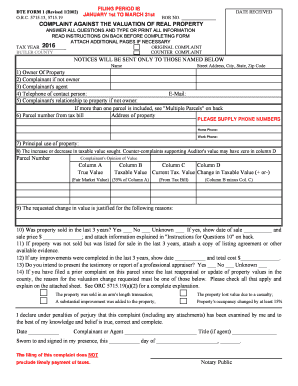
Filling out the DTE FORM 1 is a crucial step for individuals who wish to contest the valuation of their real property in Butler County. This guide offers clear and supportive instructions to help users successfully complete the form online.
Follow the steps to fill out the DTE FORM 1 online.
- Press the ‘Get Form’ button to retrieve the DTE FORM 1 and open it in the editor for modifications.
- Begin by filling out the 'Date Received' section. Enter the date when you are submitting the form. Include the BOR (Board of Revision) number if known.
- Indicate whether the complaint is an 'Original Complaint' or a 'Counter Complaint' by marking the appropriate box.
- Provide your name, physical address, city, state, and zip code in the designated fields. Make sure all information is accurate.
- In section 1, specify the owner of the property. If you are the complainant and not the owner, fill in your details in section 2.
- Complete section 6 by entering the parcel number from your tax bill and the address of the property in question.
- Indicate the principal use of the property in section 7, and clarify any changes in value you are addressing in section 8.
- In section 9, provide a justification for the requested change in value, detailing why you believe an adjustment is necessary.
- Respond to questions regarding any past sales or improvements made to the property, as detailed in sections 10-12.
- Finally, review your completed form for accuracy. Sign and date the form in the designated area, ensuring all necessary sections are filled out.
- Once satisfied with your form, save your changes, download the completed document, and print it if needed. Be prepared to submit it to the Butler County Auditor's office.
Complete your documents online today to ensure timely submission and processing.
Both of these amounts are taxable. Line 4: Enter income from any other sources not included above (income reported on Form(s) 1099-MISC, self-employment income, business income). Do NOT include any Social Security benefits as they are not taxable in Ohio.