Loading
Get Electronic Fund Transfer (eft) /direct Deposit Authorization Form - Afspa
How it works
-

Open form follow the instructions
-

Easily sign the form with your finger
-

Send filled & signed form or save
How to fill out the Electronic Fund Transfer (EFT) /Direct Deposit Authorization Form - Afspa online
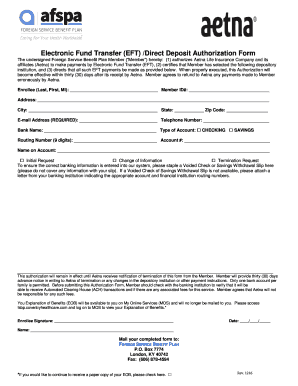
Filling out the Electronic Fund Transfer (EFT) /Direct Deposit Authorization Form - Afspa online can streamline the payment process for users. This guide provides clear, step-by-step instructions to effortlessly complete the form, ensuring that your banking information is accurately submitted for direct deposits.
Follow the steps to complete your EFT/Direct Deposit Authorization Form online.
- Press the ‘Get Form’ button to access the form and open it in your selected editor.
- Begin by entering your name in the 'Enrollee (Last, First, MI)' field along with your Member ID number. This information verifies your identity with Aetna.
- Next, provide your address, including city, state, and zip code. Accurate contact information is crucial for future correspondence.
- Input your email address, which is required for electronic communication, and telephone number for any follow-up inquiries.
- Select your bank name and indicate the type of account you are using by checking either 'CHECKING' or 'SAVINGS'.
- Fill in your routing number (9-digit) and account number, ensuring that these numbers match those provided by your bank.
- Complete the field labeled 'Name on Account' with the name associated with the bank account to confirm ownership.
- Choose one option from 'Change of Information', 'Termination Request', or 'Initial Request' based on your needs.
- Staple a Voided Check or Savings Withdrawal Slip to the form where indicated. If you do not have these, attach a letter from your bank stating the correct account information.
- Review your entries for accuracy. This authorization will stay effective until Aetna receives written notification of any changes or termination from you.
- Sign and date the form in the designated areas to certify that all information provided is correct.
- Finally, mail your completed form to the FOREIGN SERVICE BENEFIT PLAN at the provided P.O. Box address, or opt to fax it as per your convenience.
Complete your Electronic Fund Transfer (EFT) /Direct Deposit Authorization Form online today for a seamless payment experience.
Get form
Experience a faster way to fill out and sign forms on the web. Access the most extensive library of templates available.
Get This Form Now!
Use professional pre-built templates to fill in and sign documents online faster. Get access to thousands of forms.