Loading
Form preview
  • US Legal Forms
  • Other Templates
  • More Forms
  • More Uncategorized Forms
  • Texas Form 500-2970 - Tn

Get Texas Form 500-2970 - Tn

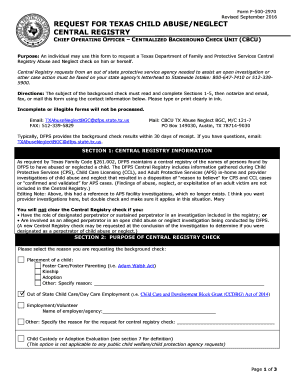
Form F5002970 Revised September 2016 REQUEST FOR TEXAS CHILD ABUSE/NEGLECT CENTRAL REGISTRY CHIEF OPERATING OFFICER CENTRALIZED BACKGROUND CHECK UNIT (CBCU) Purpose: An individual may use this form.

How it works

  1. Open form

    Open form follow the instructions

  2. Easily sign form

    Easily sign the form with your finger

  3. Share form

    Send filled & signed form or save

How to fill out the Texas Form 500-2970 - Tn online

The Texas Form 500-2970 - Tn is used to request a background check from the Texas Department of Family and Protective Services Central Registry for abuse and neglect. This guide provides clear instructions for completing the form online, ensuring that all necessary information is accurately submitted.

Follow the steps to complete the Texas Form 500-2970 - Tn online.

  1. Press the ‘Get Form’ button to obtain the form and open it in your preferred editing tool.
  2. Complete Section 1: Central Registry Information. This section outlines the purpose of the background check and identifies if you have previously been implicated as a perpetrator in any investigations.
  3. Fill out Section 2: Purpose of Central Registry Check. Select the reason you are requesting the check, including placements or employment opportunities.
  4. Input details in Section 3: Subject of the Background Check. Ensure to provide all names you have used, including current and past names, and be thorough when filling in personal information.
  5. In Section 4: Release of Results, specify how you wish to receive the results. Choose either via email or by mail to the address in Section 3.
  6. Complete Section 5: Designee. If you wish to have results sent to someone other than yourself, list their information here, noting the exceptions for employment-related requests.
  7. Sign and date Section 6: Signatures in the presence of a Notary Public. This step is critical for validating your request.
  8. If applicable, complete Section 7: Child Custody or Adoption Evaluators, ensuring all necessary signatures and documentation are attached.
  9. Review all sections for completeness and accuracy. Ensure that all sections are clearly filled out, as incomplete forms will delay processing.
  10. Finalize your submission. Save the document with your changes, and choose to download, print, or share the form as required.

Start your process for completing the Texas Form 500-2970 - Tn online today.

Get form

Experience a faster way to fill out and sign forms on the web. Access the most extensive library of templates available.
Get form

Related content

request for texas child abuse/neglect central...
Form F-500-2970. Revised September 2017. Page 1 of 4. REQUEST FOR TEXAS CHILD...
Learn more
State Child Abuse Registries (Adam Walsh checks)...
Form Required: BCIA 4057 Child Abuse ... https://files.dcs.tn.gov/forms/0741.pdf...
Learn more

Related links form

Emirates Of Abu Dhabi Finance Department SUPPLIER RECORD ADDITION / MODIFICATION REQUEST Department Uva My Charts Subway Group Order Form Bsc4success

Questions & Answers

Get answers to your most pressing questions about US Legal Forms API.

Contact support

The caseworker may ask to inspect the child's home. The caseworker may also ask for a list of individuals who regularly visit the child's home and complete a criminal and DFPS background check on all residents of the home. A parent may undergo a thorough or abbreviated investigation.

They may want to see if there is food in the house, proper sleeping conditions, and plenty of clothes. But, they're also looking for signs of health issues, drugs, weapons, and anything that might be used against you. How far you let CPS go in looking around is up to you.

How long does a CPS case stay on your record? As mentioned, upon conviction for abuse or child neglect, the DSS (Department of Social Services) creates a record that it keeps for up to ten years after the youngest child in the report turns eighteen.

Medical neglect is the failure to seek, obtain, or administer a medical treatment that could result in substantial harm to your child. On the other hand, physical neglect is the failure to provide a child with the necessary food, clothing, and shelter to maintain a healthy life.

The purpose of the Central Registry background checks is to determine if the background check subject has any alleged, designated, or sustained abuse or neglect findings that make the background check subject ineligible to be present at an operation or conditions on the subject's presence at the operation are needed to ...

CPS cannot enter your home unless you give them permission to do so, they have a court order allowing them to lawfully enter your home, or have compelling evidence that your child is in immediate danger.

For a first-degree felony, the parent can face between 5 to 99 years in prison and a fine up to $10,000. For a second-degree felony, the parent can face between 2 to 20 years in prison and up to $10,000 in fines. For a third-degree felony, the parent can face 2 to 10 years in prison and up to $10,000 in fines.

Attached to this right is the right not to provide access to your home or even to your child. CPS can only enter your home without a court order when it has your permission to do so. Technically, any person over the age of 16 who answers the door to your home can grant permission to CPS to enter.

Get This Form Now!

Use professional pre-built templates to fill in and sign documents online faster. Get access to thousands of forms.
Get form
If you believe that this page should be taken down, please follow our DMCA take down processhere.
Get Texas Form 500-2970 - Tn
Get form
  • Adoption
  • Bankruptcy
  • Contractors
  • Divorce
  • Home Sales
  • Employment
  • Identity Theft
  • Incorporation
  • Landlord Tenant
  • Living Trust
  • Name Change
  • Personal Planning
  • Small Business
  • Wills & Estates
  • Packages A-Z
  • Affidavits
  • Bankruptcy
  • Bill of Sale
  • Corporate - LLC
  • Divorce
  • Employment
  • Identity Theft
  • Internet Technology
  • Landlord Tenant
  • Living Wills
  • Name Change
  • Power of Attorney
  • Real Estate
  • Small Estates
  • Wills
  • All Forms
  • Forms A-Z
  • Other Templates
  • Legal Hub
  • About Us
  • Help Portal
  • Legal Resources
  • Blog
  • Affiliates
  • Contact Us
  • Delete My Account
  • Site Map
  • Industries
  • Forms in Spanish
  • Localized Forms
  • State-specific Forms
  • Forms Kit
  • Real Estate Handbook
  • All Guides
  • Notarize
  • Incorporation services
  • For Consumers
  • For Small Business
  • For Attorneys
  • USLegal
  • FormsPass
  • pdfFiller
  • signNow
  • altaFlow
  • DocHub
  • Instapage
Form Packages
  • Adoption
  • Bankruptcy
  • Contractors
  • Divorce
  • Home Sales
  • Employment
  • Identity Theft
  • Incorporation
  • Landlord Tenant
  • Living Trust
  • Name Change
  • Personal Planning
  • Small Business
  • Wills & Estates
  • Packages A-Z
Form Categories
  • Affidavits
  • Bankruptcy
  • Bill of Sale
  • Corporate - LLC
  • Divorce
  • Employment
  • Identity Theft
  • Internet Technology
  • Landlord Tenant
  • Living Wills
  • Name Change
  • Power of Attorney
  • Real Estate
  • Small Estates
  • Wills
  • All Forms
  • Forms A-Z
  • Other Templates
Customer Service
  • Legal Hub
  • About Us
  • Help Portal
  • Legal Resources
  • Blog
  • Affiliates
  • Contact Us
  • Delete My Account
  • Site Map
  • Industries
  • Forms in Spanish
  • Localized Forms
  • State-specific Forms
  • Forms Kit
Legal Guides
  • Real Estate Handbook
  • All Guides
Prepared for you
  • Notarize
  • Incorporation services
Our Customers
  • For Consumers
  • For Small Business
  • For Attorneys
Our Sites
  • USLegal
  • FormsPass
  • pdfFiller
  • signNow
  • altaFlow
  • DocHub
  • Instapage
Social Media
Call us now toll free:
+1 833 426 79 33
As seen in:
© Copyright 1999-2026 airSlate Legal Forms, Inc. 17 Station Street, Suite 303, Brookline, MA 02445
  • Your Privacy Choices
  • Terms of Service
  • Privacy Notice
  • Content Takedown Policy
  • Bug Bounty Program