Loading
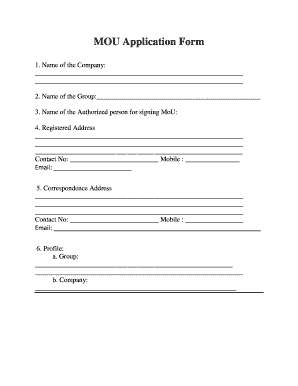
Get Application Form For Signing Mou With Trifac - Bhopalmp.com
How it works
-

Open form follow the instructions
-

Easily sign the form with your finger
-

Send filled & signed form or save
How to fill out the Application Form For Signing MOU With TRIFAC - Bhopalmp.com online
Filling out the application form for signing a Memorandum of Understanding (MoU) with TRIFAC is essential for organizations seeking collaboration. This guide provides a clear, step-by-step approach to ensure the form is completed accurately and efficiently.
Follow the steps to successfully complete the application form:
- Click ‘Get Form’ button to obtain the form and open it in the editor.
- Start by entering the name of your company in the designated field. Ensure that the name is accurate and corresponds with your registered business name.
- Provide the name of your group, ensuring it is clear and correctly spelled.
- Fill in the name of the authorized person who will be signing the MoU. This should be a representative with the authority to commit your organization.
- Complete the registered address section, including street address, city, state, and ZIP code. Be sure to provide accurate contact numbers and email addresses.
- Input the correspondence address in a similar manner, stating the street address, city, state, and ZIP code, along with the respective contact details.
- In the profile section, detail your group's and company's profiles, including a brief overview of operations and mission.
- List the permanent addresses of the directors, chairman, and managing directors, including their respective contact numbers and email addresses.
- Provide financial details for the last three years. If the company is new, include financial details from the promoter or parent company.
- Indicate the name of the project you are proposing.
- Describe your project in detail, including its items, products, and capacity.
- Specify the total investment required for the project on a phase-wise basis.
- Identify the proposed area for the project, including the tehsil and district.
- Provide details regarding employment projections, mentioning direct, indirect, and total employment expected.
- Answer whether you have identified or applied for government land, and specify the location.
- Indicate if you have purchased or propose to purchase private land, noting the location.
- Attach a board resolution confirming the authorized signatory for this application.
- Read the declaration statement carefully before signing, confirming that all information provided is accurate. Ensure your application seal and signature is included.
- After filling out all sections, save your changes, and choose to download, print, or share the completed form as needed.
Complete your documents online for the signing process.
Industry-leading security and compliance
US Legal Forms protects your data by complying with industry-specific security standards.
-
In businnes since 199725+ years providing professional legal documents.
-
Accredited businessGuarantees that a business meets BBB accreditation standards in the US and Canada.
-
Secured by BraintreeValidated Level 1 PCI DSS compliant payment gateway that accepts most major credit and debit card brands from across the globe.