Loading
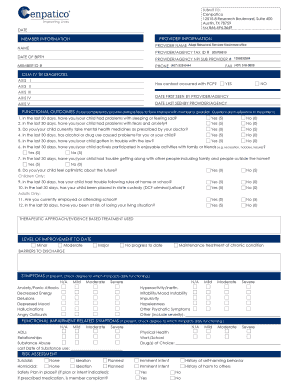
Get Cenpatico Otr - Adapt Behavioral Services
How it works
-

Open form follow the instructions
-

Easily sign the form with your finger
-

Send filled & signed form or save
How to fill out the Cenpatico OTR - Adapt Behavioral Services online
The Cenpatico OTR - Adapt Behavioral Services form is designed to collect essential information for behavioral health services. This guide provides comprehensive, step-by-step instructions to assist users in accurately completing the form online.
Follow the steps to complete the form accurately and efficiently.
- Press the ‘Get Form’ button to access the form and open it in the editor for online completion.
- Begin by entering the date at the top of the form. This should reflect the current date on which the form is being completed.
- Fill in the provider information section, including the provider's name, tax identification number, NPI sub-provider number, phone number, and fax number. Ensure all information is accurate to avoid processing delays.
- In the member information section, enter the member's name, date of birth, and member ID number. It is crucial to have the correct ID number for effective service provision.
- Proceed to the DSM-IV TR Diagnosis section, where appropriate codes for Axis I, II, III, IV, and V should be filled if applicable. This requires familiarity with diagnosis coding.
- Indicate whether contact has occurred with the primary care physician by selecting ‘Yes’ or ‘No’ appropriately.
- Input the dates for when the member was first and last seen by the provider or agency. This is essential for understanding the member's treatment history.
- The functional outcomes section must be completed based on responses from the member or guardian regarding their recent experiences. Answer questions regarding sleeping problems, anxiety, medication compliance, substance use, and legal issues, selecting the appropriate response for each.
- Complete the therapeutic approach/evidence-based treatment used section. This refers to the methods and strategies employed during treatment.
- Assess and fill out the level of improvement to date based on the member's progress under various categories.
- In the symptoms section, check the degree to which various symptoms impact daily functioning, marking as Mild, Moderate, Severe, or N/A as appropriate.
- Provide details about functional impairment symptoms and check the related degree of impact, ensuring to note any dates of last substance use.
- Complete the risk assessment section by indicating suicidal or homicidal ideation and whether a safety plan is in place.
- List current measurable treatment goals and indicate requested authorization for services by checking the relevant boxes.
- Fill in details for any services being requested along with their frequency and anticipated completion date. Include CPT codes as required for billing.
- Conclude by having the provider name, signature, and date filled out. Users may attach any additional documents that support the request.
- Finally, review all entries for accuracy. Save changes, download, print, or share the completed form as necessary.
Take the next step in securing support by completing the Cenpatico OTR - Adapt Behavioral Services form online today.
Where can I use my My Health Pays® rewards? You can buy any item at any Walmart or Sam's Club location, with the exception of alcohol, tobacco, guns or ammunition. Plus, you can use your rewards to help pay for: Household Utilities, Telecommunications, Transportation, Child Care Services, Education and Rent.