Loading
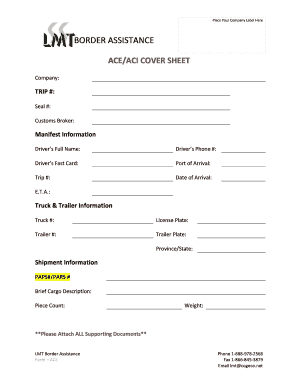
Get Ace/aci Cover Sheet - Lmt Border Assistance
How it works
-

Open form follow the instructions
-

Easily sign the form with your finger
-

Send filled & signed form or save
How to fill out the ACE/ACI COVER SHEET - LMT Border Assistance online
Filling out the ACE/ACI Cover Sheet for LMT Border Assistance is a vital step for efficient customs processing. This guide provides clear, step-by-step instructions to help you complete the form accurately and easily.
Follow the steps to complete the ACE/ACI Cover Sheet effectively.
- Utilize the ‘Get Form’ button to access the form and open it in your web-based editor.
- Begin by entering your company name in the designated field at the top of the form. This identifies the entity submitting the request.
- Fill in the Trip number and Seal number; these fields are essential for tracking your shipment details.
- In the Customs Broker section, include the name of your customs broker to ensure proper communication.
- Next, move on to the Manifest Information section. Provide the driver’s full name, phone number, and Fast Card number to facilitate quick identification.
- Indicate the Port of Arrival, Trip Number, Date of Arrival, and Estimated Time of Arrival (E.T.A.) to manage arrival procedures effectively.
- Complete the Truck & Trailer Information fields by inputting the truck number, license plate, trailer number, trailer plate, and the relevant province or state where the vehicle is registered.
- In the Shipment Information section, enter the PAPS#/PARS #, a brief description of the cargo, the piece count, and total weight of the shipment.
- Finally, ensure you attach all supporting documents as outlined to avoid processing delays.
- After all fields are adequately filled out, save your changes, and choose to download, print, or share the form as needed.
Complete your documents online today for seamless customs processing.
Canada's eManifest requirement is the ACI (Advanced Commercial Information), and the American counterpart is called ACE (Automated Commercial Environment).