Loading
Get Gacaps
How it works
-

Open form follow the instructions
-

Easily sign the form with your finger
-

Send filled & signed form or save
How to fill out the Gacaps online
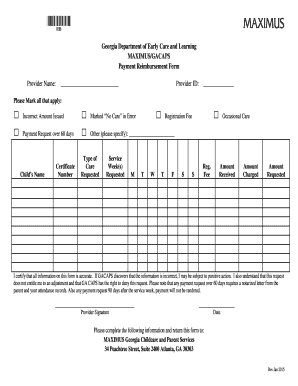
Filling out the Gacaps payment reimbursement form is an essential step for providers seeking reimbursement for childcare services. This guide provides a comprehensive, step-by-step approach to ensure you successfully complete the form accurately and efficiently.
Follow the steps to fill out the Gacaps form correctly.
- Use the ‘Get Form’ button to access the Gacaps payment reimbursement form and open it in your editing tool.
- Begin by entering your provider name in the designated field. This identifies you as the individual seeking reimbursement.
- Next, input your provider ID to further validate your identity within the care system.
- Mark all applicable boxes indicating the reasons for your reimbursement request. These may include options such as 'Incorrect Amount Issued' or 'Payment Request over 60 days.' Be sure to specify the type of care requested.
- Enter the child’s name and their certificate number in the designated fields to associate the reimbursement request with the appropriate child.
- Specify the service week(s) requested by marking the relevant days of the week in the provided section.
- Fill in the amounts in the fields for the registration fee, amount received, amount charged, and amount requested to provide a complete financial overview.
- Before submitting, read the certification statement carefully. By signing, you confirm that all provided information is accurate.
- Sign and date the form in the designated areas, ensuring you follow all certification requirements.
- Finally, save your changes, then download, print, or share the completed form as needed. Ensure it is sent to the specified address: MAXIMUS Georgia Childcare and Parent Services, 34 Peachtree Street, Suite 2400, Atlanta, GA 30303.
Get started by completing your Gacaps documents online today.
1:07 3:31 Introducing the NEW CAPS Family Fee and Quality Rated Discount YouTube Start of suggested clip End of suggested clip With. The new family fee. The same family will pay five percent of their income. For $19 per weekMoreWith. The new family fee. The same family will pay five percent of their income. For $19 per week this will save them $23.