Loading
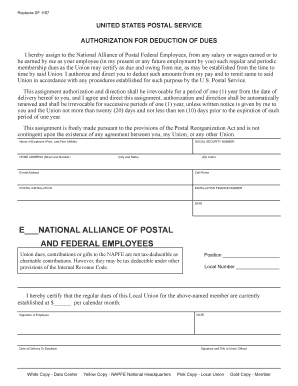
Get Replaces Sf 1187
How it works
-

Open form follow the instructions
-

Easily sign the form with your finger
-

Send filled & signed form or save
How to fill out the Replaces SF 1187 online
Filling out the Replaces SF 1187 form is an essential process for employees wishing to authorize the deduction of union dues. This guide will provide a clear, step-by-step approach to ensure you complete the form accurately and confidently.
Follow the steps to fill out the Replaces SF 1187 online.
- To commence the process, click the ‘Get Form’ button to access the Replaces SF 1187 document electronically.
- Begin by entering your name in the section designated for the employee’s name. Ensure that you provide your last name followed by your first and middle name as applicable.
- Next, fill in your home address, including the street number, city, state, and zip code, ensuring that all information is current and accurate.
- Provide your social security number in the designated field to facilitate the processing of your union dues authorization.
- You will also need to enter your email address and cell phone number to ensure that the union can contact you if needed.
- In the next section, indicate your postal installation and the corresponding installation finance number.
- Fill in the current date on which you are completing the form.
- Specify your position within the postal service and provide the local union number.
- The union dues amount should be filled out in the designated area. This figure must reflect the current dues as certified by the union.
- Lastly, sign and date the form to authenticate your request. Ensure that you also include the date of delivery to your employer.
- Once you have completed all fields accurately, you can save your changes, download, print, or share the completed form as required.
Complete your Replaces SF 1187 form online to get started with your union dues authorization.
Active dues-withholding NAPS members must submit the PS Form 1188 to USPS HRSSC (Human Resources & Shared Services Center) in order to cancel their membership and stop automatic dues payroll deductions. The form may be submitted at any time.