Loading
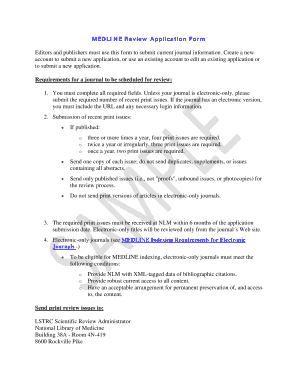
Get Medline Review Application Form - Repozitorijum.nb.rs - Repozitorijum Nb
How it works
-

Open form follow the instructions
-

Easily sign the form with your finger
-

Send filled & signed form or save
How to fill out the MEDLINE Review Application Form - Repozitorijum.nb.rs - Repozitorijum Nb online
This guide provides a clear and comprehensive overview of how to complete the MEDLINE Review Application Form. Whether you are submitting a new application or updating an existing one, follow these step-by-step instructions for successful completion.
Follow the steps to successfully fill out the MEDLINE Review Application Form.
- Press the ‘Get Form’ button to access the MEDLINE Review Application Form in your browser.
- Start by entering the Journal Title in the required field. Make sure it accurately reflects the journal you are submitting.
- If your journal has a previous title, provide it in the relevant field or skip this step if not applicable.
- Request an ISSN if you do not have one. Utilize the provided resources to find the appropriate contact for obtaining an ISSN.
- Indicate whether your journal has a Print ISSN or Electronic ISSN and fill in the required information as applicable.
- Complete the Publisher Information including the Year of First Issue, Country of Publication, and Language of the Journal. Select multiple languages by holding the 'Ctrl' key while making your selections.
- Specify the Frequency of Publication and indicate if the journal is Open Access. If it’s an electronic-only journal, provide the URL along with a user name and password for NLM full access during the review process.
- Fill out the Editor's Name, their Full Mailing Address, Email Address, and the Publisher Contact details.
- Provide a brief description of the Aims and Scope of your journal, outlining its niche and intended audience within the 800-character limit.
- List the Editorial Board Members and their Affiliations, if not provided in the journal issue, adhering to the max character limit.
- Answer questions regarding the Review by Editor or Editorial Board, the use of Outside Peer Reviewers, and provide a description of the Peer Review process.
- Complete the Additional questions on the types of articles published, funding sources, and whether the journal states any conflicts of interest.
- If applicable, provide information pertaining to published statements of Informed Consent, Human and Animal Rights, and compliance with established recommendations.
- If there is any additional information regarding the journal’s quality or processes that could assist reviewers, note that in the space provided.
- Finally, enter the name of the person completing the form, their position, email address, and date of submission. Remember that completing all required fields marked with an asterisk is essential to submit the application.
- After providing all necessary details, save your work if you wish to complete the form later, or click ‘Submit for Review’ to send your application.
Take the next step toward your journal's indexing by completing the MEDLINE Review Application Form online today.
Your article will not be indexed in PMC while it is OnlineFirst. If your journal is indexed in PubMed through MEDLINE, then you can expect it to appear in PubMed within 1-2 weeks of its first publication date. MEDLINE will index articles while they are OnlineFirst.
Industry-leading security and compliance
US Legal Forms protects your data by complying with industry-specific security standards.
-
In businnes since 199725+ years providing professional legal documents.
-
Accredited businessGuarantees that a business meets BBB accreditation standards in the US and Canada.
-
Secured by BraintreeValidated Level 1 PCI DSS compliant payment gateway that accepts most major credit and debit card brands from across the globe.