D No.* ZIP code and city* Country* E-mail* Telephone* Fax Place, date* Signature* *Mandatory field which must be filled out. GRIDGUARD-ZEN124411 Service Line Tel. +49 561 9522-1499 Fax +49 561 9522-4699 E-mail: Inst-Code@SMA.de SMA Solar Technology AG Headquarters: 34266 Niestetal, Germany Registered court: Kassel HRB 3972 Chairman of the Supervisory Board: Günther Cramer Executive Board: Jürgen Dolle, Roland Grebe, Lydia Sommer, Pierre-Pascal Urbon, Marko Werner VAT No. DE 113 08 59.
Open form follow the instructions
Easily sign the form with your finger
Send filled & signed form or save
How to fill out the DE SMA Solar Technology AG Application for SMA Grid Guard-Code online
Completing the DE SMA Solar Technology AG Application for SMA Grid Guard-Code online is an important step for accessing the necessary modifications for your SMA Grid Guard® system. This guide will provide you with clear instructions to fill out the application accurately and efficiently.
Follow the steps to fill out the application effectively
- Click ‘Get Form’ button to obtain the application form and open it in the online editor.
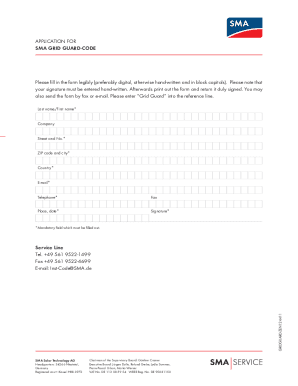
- Begin by filling out your personal information in the mandatory fields, such as 'Last name' and 'First name'. Make sure this information is legible.
- Next, proceed to fill in your 'Company' name if applicable, followed by your 'Street and No.' which indicates your residential or business address.
- Input your 'ZIP code and city' to specify your location. Ensure these details are accurate as they may be used for verification.
- Select your 'Country' from the drop-down menu or input it, depending on the online interface.
- Enter your 'E-mail' address to ensure you can receive notifications related to your application. This must also be legible.
- Provide your 'Telephone' number, and if applicable, your 'Fax' number.
- In the 'Place, date' field, include the current date and the location from where you are submitting the application.
- Finally, hand-sign your application in the designated 'Signature' field. Remember that a hand-written signature is required.
- Once completed, review your application carefully for accuracy, then save changes, download the form, and print it out for submission. You may send your application form via fax or e-mail, ensuring to reference 'Grid Guard'.
Complete your DE SMA Solar Technology AG Application for SMA Grid Guard-Code online today!
Experience a faster way to fill out and sign forms on the web. Access the most extensive library of templates available.
Related content
Aug 31, 2010 — Grid monitoring (SMA Grid Guard). All-pole sensitive residual ... SMA...
This guidebook serves as a comprehensive best practice manual tailored for the...
Feb 10, 2010 — In order to change SMA Grid Guard parameters, you will need to be logged...
Get answers to your most pressing questions about US Legal Forms API.
What is the default password for SMA WiFi?
The default password for SMA WiFi typically comes with your device documentation. Commonly, this password might be listed on a sticker or in the user manual. If you need assistance managing your WiFi settings, the DE SMA Solar Technology AG Application for SMA Grid Guard-Code serves as a reliable platform to help you navigate through these configurations.
How do I get my SMA grid guard code?
To obtain your SMA grid guard code, you need to access your SMA system's settings through the dedicated application or user interface. This code is often generated during the installation process or can be requested from your solar installer. The DE SMA Solar Technology AG Application for SMA Grid Guard-Code is an excellent tool to help guide you through this process and ensure that you're set up correctly.
How do I change my SMA inverter password?
Changing your SMA inverter password is a straightforward process. You can log into your inverter’s web interface, navigate to the settings section, and select the option to change your password. For more specific steps tailored to your model, consult the DE SMA Solar Technology AG Application for SMA Grid Guard-Code, which is designed to help users manage their inverter settings effectively.
How do I find my SMA inverter password?
To find your SMA inverter password, begin by checking the user manual or the documentation that came with your inverter. Most models have a default password printed on a label or in the manual. If you have changed it and can't remember, the DE SMA Solar Technology AG Application for SMA Grid Guard-Code provides guidance on how to reset your password and regain access.
What is the password for solar go installer?
For the solar go installer, the password is usually set by the user during installation. If you have not set one or have forgotten it, you can reset it through the application settings. The DE SMA Solar Technology AG Application for SMA Grid Guard-Code offers streamlined instructions for users needing assistance with password-related issues, making it an essential resource.
What is the password for SMA solar installer?
The password for the SMA solar installer can vary based on your setup and configurations. Generally, it is important to check the documentation included with your system, as it often contains the default credentials. If you connected through the DE SMA Solar Technology AG Application for SMA Grid Guard-Code, you might find helpful resources and guidance there to reset or retrieve your password.
What is the password for SonicWall SMA?
The default password for SonicWall SMA typically depends on the model you are using. If you have not changed the password, it is often ‘admin’ or ‘password’. Please refer to the user manual for your specific SonicWall SMA model. Additionally, you can find detailed instructions on how to manage your passwords in the DE SMA Solar Technology AG Application for SMA Grid Guard-Code.
What language code is SMA?
The language code commonly associated with SMA technology refers to a specific set of parameters used within the software. While SMA products are available in various languages, the DE SMA Solar Technology AG Application for SMA Grid Guard-Code typically supports multiple languages for user convenience. Make sure to select the appropriate language setting to enhance your experience while using the system.
What is the password for the SMA plant?
The password for accessing the SMA plant configuration generally varies by installation and must be set up during the configuration process. For specific guidance related to passwords and security, refer to the DE SMA Solar Technology AG Application for SMA Grid Guard-Code documentation. If you face challenges, tools like uslegalforms can provide checklists and templates to ensure secure password management.
What is error code 8206 on SMA?
Error code 8206 on SMA devices indicates a communication issue within the system. It often suggests a need for troubleshooting connections or reviewing settings within the DE SMA Solar Technology AG Application for SMA Grid Guard-Code. Addressing this error promptly helps maintain the efficiency and reliability of your solar energy system.
Use professional pre-built templates to fill in and sign documents online faster. Get access to thousands of forms.
If you believe that this page should be taken down, please follow our DMCA take down process here.