Loading
Get Permanent Directory Card Phi Sigma Tau - Villanova
How it works
-

Open form follow the instructions
-

Easily sign the form with your finger
-

Send filled & signed form or save
How to fill out the PERMANENT DIRECTORY CARD PHI SIGMA TAU - Villanova online
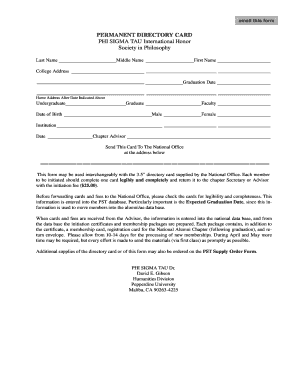
Filling out the Permanent Directory Card for Phi Sigma Tau - Villanova is an essential step for members to ensure their information is accurately recorded. This guide provides detailed, step-by-step instructions to help you complete the form easily and effectively.
Follow the steps to complete your Permanent Directory Card
- Click ‘Get Form’ button to obtain the form and open it in the editor.
- Begin filling out the form by entering your last name, middle name, and first name in the designated fields. Ensure that you spell your names correctly for accurate record-keeping.
- Provide your college address, which will be the location where you can be reached while attending the institution. This information is vital for future correspondence.
- Indicate your expected graduation date. This is crucial as it helps in managing alumni records and preparing future membership packages.
- Complete the home address section, providing the address where you will be residing after your graduation date.
- Select whether you are an undergraduate or graduate student by marking the appropriate option.
- Enter your date of birth. Make sure the date is accurate, as it might be used for identification purposes.
- Specify your faculty and select your gender from the available options: male or female. This information helps in maintaining demographic records.
- Include the name of your institution and the date of filling out the form. This ensures all records are up to date.
- List your chapter advisor's name in the provided space. This is important for accountability within the chapter.
- Indicate where to send the card by entering the address of the National Office as stated below the address fields.
- Review the completed form to ensure all information is accurate and legible. Once confirmed, save any changes and proceed to download, print, or share the form as needed.
Complete your document online to ensure your membership information is accurately recorded and processed.
Industry-leading security and compliance
US Legal Forms protects your data by complying with industry-specific security standards.
-
In businnes since 199725+ years providing professional legal documents.
-
Accredited businessGuarantees that a business meets BBB accreditation standards in the US and Canada.
-
Secured by BraintreeValidated Level 1 PCI DSS compliant payment gateway that accepts most major credit and debit card brands from across the globe.