Loading
Get Ceorajasthan Nic In
How it works
-

Open form follow the instructions
-

Easily sign the form with your finger
-

Send filled & signed form or save
How to fill out the Ceorajasthan Nic In online
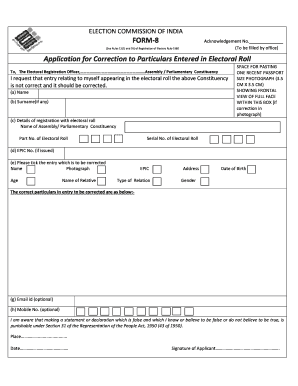
Filling out the Ceorajasthan Nic In form is an essential process for correcting particulars in the electoral roll. This guide provides clear and supportive instructions to help users effectively complete the form online.
Follow the steps to successfully fill out the Ceorajasthan Nic In form.
- Click ‘Get Form’ button to obtain the form and open it in the editor.
- Begin by providing your name and surname (if applicable) in the indicated fields. Ensure that the information matches your official documents.
- Attach a recent passport-sized photograph (3.5 cm x 3.5 cm) showing a clear frontal view of your full face in the designated space provided.
- Fill out the details of your registration as they appear in the electoral roll, including the name of your constituency, the part number of the electoral roll, and the serial number of the electoral roll.
- Enter your Electoral Photo Identity Card (EPIC) number if you have one. This information can help verify your identity.
- Tick the particular entry that you wish to correct. Options include name, photograph, age, name of relative, EPIC, type of relation, address, date of birth, and gender.
- Provide the correct particulars that need to be rectified in the space allocated beneath the corrections you have selected.
- Optionally, you may enter your email ID and mobile number for any further communication regarding your application.
- Review your filled information carefully, noting that sections regarding false statements are in place to inform you of the legal consequences.
- Sign the application form, confirming that the information provided is accurate and true to the best of your knowledge. Finally, save your changes, download the form, print it, or share it as needed.
Complete your electoral correction application online today to ensure your details are accurate.
Name:Sh. Praveen Gupta, IAS Address: Office of Chief Electoral Officer Room no.-5208, Main Building, Secretariat, Jaipur Phone: 0141-2227666 (O) Fax: E-mail: ceo_rajasthan[at]nic[dot]in