Get Ny Construction Superintendent (cs) Inspection Log 2016-2026
How it works
-

Open form follow the instructions
-

Easily sign the form with your finger
-

Send filled & signed form or save
How to fill out the NY Construction Superintendent (CS) Inspection Log online
The NY Construction Superintendent (CS) Inspection Log is an essential document for tracking construction site management and compliance. This guide provides clear instructions on how to complete the log online, ensuring all necessary information is captured accurately.
Follow the steps to fill out the NY CS Inspection Log seamlessly.
- Press the ‘Get Form’ button to access the inspection log and open it in the online editor.
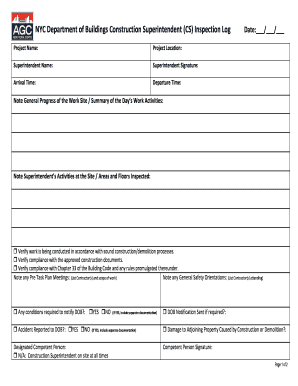
- Enter the project name in the designated field at the top of the form. This information identifies the specific construction project.
- Fill in the project location, specifying the address where the construction is taking place.
- Provide the superintendent's name, ensuring to include the full name of the person responsible for overseeing the site.
- Require a signature from the superintendent in the designated signature area. This confirms their active supervision on site.
- Record the arrival and departure times, making note of the times the superintendent was on site for the inspection day.
- Input the date of the inspection in the format ___/___/___, ensuring the date is accurate to reflect when the log is being completed.
- Summarize the general progress of the work site, detailing the day's activities and any relevant observations.
- Document the superintendent’s specific activities at the site, including areas and floors inspected on that day.
- Check the boxes to confirm verification of compliance with construction practices, approved documents, and safety codes.
- List any Pre Task Plan Meetings that took place, noting the contractors involved and the scope of work discussed.
- Document any General Safety Orientations that occurred, specifying the contractors who attended.
- Respond to questions regarding conditions that required notification to the DOB, and whether accidents were reported, ensuring to include separate documentation if necessary.
- Identify the designated competent person and check the appropriate box based on on-site presence and duties.
- If applicable, provide information regarding damage to adjoining properties caused by the construction or demolition processes.
- Note any unsafe conditions observed, including the specific areas identified and the times noted.
- Ensure that notifications sent regarding these unsafe conditions are documented.
- Summarize any corrective actions taken and identify the responsible individuals for completing necessary corrections.
- List any violations, stop work orders, or summonses issued by the DOB, along with relevant dates for tracking compliance.
- Finally, save your changes, then download, print, or share the completed inspection log as necessary.
Complete and submit your NY Construction Superintendent (CS) Inspection Log online to maintain compliance and accountability on your construction project.
licensed superintendent in NYC generally earns between $85,000 and $140,000 annually, depending on various factors such as experience and project complexity. These professionals have crucial responsibilities that ensure compliance with regulations and safety standards. Their specialized license adds value, making them highly sought after. Implementing a NY Construction Superintendent (CS) Inspection Log can further enhance their efficiency and effectiveness on the job.