Loading
Get Mynygov
How it works
-

Open form follow the instructions
-

Easily sign the form with your finger
-

Send filled & signed form or save
How to fill out the Mynygov online
Navigating the Mynygov platform for your Teacher’s Permit/License application can be straightforward with the right guidance. This comprehensive guide will walk you through each step of the online form, ensuring a smooth and efficient process.
Follow the steps to complete your application accurately.
- Click the ‘Get Form’ button to access the Teacher’s Permit/License form online.
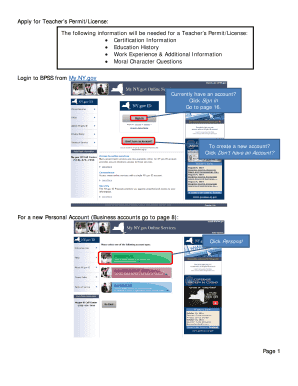
- Begin by logging into your My.NY.gov account. If you already have an account, click 'Sign in' to proceed. If you do not have an account yet, select the option indicating that you do not have one, and choose 'Personal' to create a new account.
- On the first page after selecting 'Personal,' click 'Sign up for a Personal NY.gov ID.' Enter the required information and then click 'Create Account.' If everything is correct, continue. If you need to make corrections, click 'Back.'
- Complete the registration process by clicking 'Finish' and verifying your account through the email sent to your registered email. Follow the link provided in the email.
- After clicking the link, choose a security question and provide an answer. Click 'Continue.'
- Create a new password and confirm the password before clicking 'Set Password.'
- Once your password is set, click 'Continue' to navigate to your My.NY.gov account.
- After logging into My.NY.gov, click on 'BPSS Application' and then select 'Create Account' to initiate the BPSS process.
- Fill out your details for the BPSS account and click 'Next,' followed by 'Continue.'
- Now, locate and click on 'Apply for Teacher Permit/License' to start the application process.
- Enter the required education and work experience information. Use the 'Add' button as needed to include additional details.
- For each educational detail, click 'Choose File' to upload any necessary documentation. After verifying the upload, click 'Next.'
- Complete all moral character questions, providing explanations where necessary, and uploading documents as required.
- If you are making a payment for the application, follow the prompts for payment method selection and complete your transaction.
- After payment, review all entered details and finalize your application. You can save changes, download, print, or share your completed form as needed.
Start your application for a Teacher’s Permit/License online today and ensure all necessary documents are submitted correctly.
If you are using a compatible browser and still experiencing issues, you may need to clear your browser cache and try again.
Industry-leading security and compliance
US Legal Forms protects your data by complying with industry-specific security standards.
-
In businnes since 199725+ years providing professional legal documents.
-
Accredited businessGuarantees that a business meets BBB accreditation standards in the US and Canada.
-
Secured by BraintreeValidated Level 1 PCI DSS compliant payment gateway that accepts most major credit and debit card brands from across the globe.