Loading
Get Disclosure Request - City Of Windsor
How it works
-

Open form follow the instructions
-

Easily sign the form with your finger
-

Send filled & signed form or save
How to fill out the Disclosure Request - City Of Windsor online
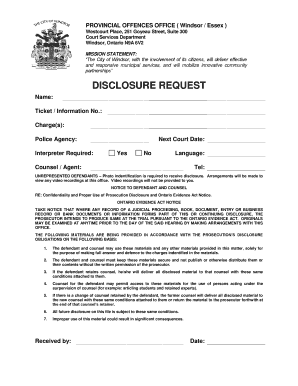
Filling out the Disclosure Request form for the City of Windsor is an essential step for individuals involved in provincial offence cases. This guide will provide you with clear and supportive instructions to help you navigate the form efficiently.
Follow the steps to complete your form successfully.
- Click the ‘Get Form’ button to access the Disclosure Request form and open it in your selected editor.
- Begin by entering your name in the designated field. This should be your full legal name as it appears on official documents.
- In the 'Ticket / Information No.' field, input the unique number associated with your ticket. This is crucial for identifying your case.
- Fill in the 'Charge(s)' section by specifying the offence or charges you are facing. Be accurate for clarity in your disclosure request.
- Indicate the 'Police Agency' involved in your case. This information helps direct your request to the appropriate authority.
- If you require an interpreter, mark 'Yes' or 'No' in the relevant field and specify your preferred language if applicable.
- State your 'Next Court Date' by indicating whether it is upcoming (check 'Yes') or not (check 'No'). This assists in prioritizing your request.
- If you have legal representation, fill in the 'Counsel / Agent' section with your lawyer's name and include their contact information in the 'Tel' field.
- For unrepresented defendants, note that photo identification is required to receive disclosure. Make plans to view any video recordings at the specified office, as they will not be provided physically.
- Review the section regarding confidentiality and proper use of prosecution disclosure. Ensure you understand the obligations and restrictions outlined.
- Once all sections are filled in accurately, you may save your changes to your device. Options to download, print, or share the form will be available at the end.
Complete your Disclosure Request form online today for timely processing.
Part III Matters (You Received a Summons and not a Ticket) If you appear by video the justice of the of the peace may order that you appear in person. Section 83.1(4) of the Provincial Offences Act permits the presiding judicial officer to order a participant to appear in-person.