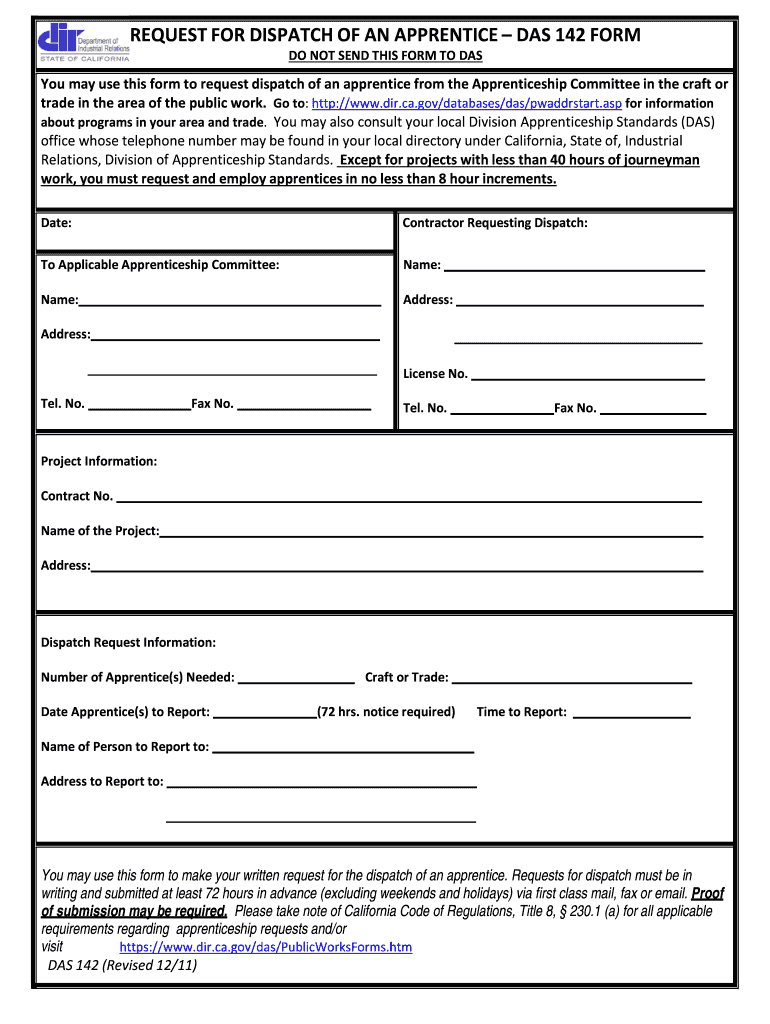
REQUEST FOR DISPATCH OF AN APPRENTICE DAS 142 FORM DO NOT SEND THIS FORM TO DAS You may use this form to request dispatch of an apprentice from the Apprenticeship Committee in the craft or trade in the area of the public work. Go to for about programs in your area and trade. You may also consult your local Division Apprenticeship DAS office whose telephone number may be found in your local directory under California State of Relations Division of Apprenticeship Standards. Except for projects with less than 40 hours of work you must request and employ apprentices in no less than 8 hour increments. Date Contractor Requesting Dispatch To Applicable Apprenticeship Committee Name Address License No* Tel* No* Fax No* Project Information Contract No* Name of the Project Dispatch Request Information Number of Apprentice s Needed Craft or Trade Date Apprentice s to Report 72 hrs. notice required Time to Report Name of Person to Report to Address to Report to writing and submitted at least 72 h....
Loading

Open form follow the instructions

Easily sign the form with your finger

Send filled & signed form or save
How to fill out the CA DAS 142 Form online
The CA DAS 142 Form is an essential document for requesting the dispatch of an apprentice from the Apprenticeship Committee within the public works sector. This guide provides clear, step-by-step instructions to help you complete the form online effectively.
Follow the steps to fill out the CA DAS 142 Form online.
- Click ‘Get Form’ button to obtain the form and open it in the editor.
- Enter the date in the designated field at the top of the form. This date indicates when your request is being made.
- Provide your name in the 'Contractor Requesting Dispatch' section. This should be the individual or business making the request.
- In the same section, enter the address of the contractor. Include all relevant details such as street address, city, and zip code.
- Input your license number in the appropriate field. This number is crucial for verifying your credentials.
- Fill in your contact details, including your telephone and fax numbers. This allows the Apprenticeship Committee to reach you if necessary.
- Move to the 'Project Information' section and input the contract number associated with the project.
- Enter the name and address of the project where the apprentice will be dispatched.
- In the 'Dispatch Request Information' section, specify how many apprentices you need and indicate the craft or trade they will be involved in.
- State the date when the apprentices are required to report. Remember, a notice of at least 72 hours is required.
- Fill in the time the apprentices should report to work.
- Provide the name of the person to whom the apprentices will report, followed by their reporting address.
- Review all entered information to ensure accuracy and completeness before submission.
- Once all fields are completed, save your changes. You can then download, print, or share the form as needed.
Complete your CA DAS 142 Form online today to streamline your apprenticeship request process.
Experience a faster way to fill out and sign forms on the web. Access the most extensive library of templates available.
Related content
You may use this form to request dispatch of an apprentice from the Apprenticeship...
... form DAS-. 142. 2. All apprentices employed by the contractor to perform any of the...
efectua a correspondência das cores das imagens utilizando esse equipamento, antes de...
Get answers to your most pressing questions about US Legal Forms API.
How to fill out a CAC2 form?
To properly complete the CAC2 form, gather your family and income details first. The form requires clear, concise information to streamline your application for childcare assistance. You can find assistance on platforms like US Legal Forms, which provide step-by-step help and resources to ease your completion of the form.
How to fill out a DAS 142?
Filling out the CA DAS 142 Form requires careful attention to detail. Start by collecting all necessary information regarding your claim. Follow the instructions closely, and don’t hesitate to use resources from US Legal Forms for guidance; they can provide templates and examples to simplify the process.
What is a CAC2 form?
The CAC2 form is a document used to report and apply for childcare assistance under the CAC program. It serves as a complementary form to the CA DAS 142 Form. Together, they help ensure that you receive the benefits you are entitled to under California's childcare assistance programs.
What is CAC in California?
CAC in California stands for Childcare Assistance Program. This program helps families by providing financial support for childcare services. If you are filling out the CA DAS 142 Form, understanding CAC can help you take full advantage of the resources available to you.
Where do I send the DAS 142 form?
The CA DAS 142 Form should be sent to the designated agency or department specified in the accompanying instructions. Typically, this will be a local government office that processes your claims or benefits. Ensure you double-check the submission address, as sending it to the wrong location may delay your processing.
What is CAC payment?
A CAC payment refers to a payment made under the California Alternative Payment Program. This program is designed to support families in accessing childcare and educational services. Understanding CAC payments and their connection to the CA DAS 142 Form can help you navigate your financial responsibilities effectively.
Is a DAS 142 required?
Yes, the CA DAS 142 Form is required in certain situations, especially when documenting claims related to benefits. This form helps streamline the process of reporting and ensures that you meet state requirements. If you are unsure whether you need to complete it, consulting an expert or using platforms like US Legal Forms can clarify your needs.
What is the journeyman to apprentice ratio in California?
In California, the typical journeyman to apprentice ratio is generally . This means that one journeyman can supervise up to five apprentices at any given time. Understanding this ratio is essential for compliance with state regulations when completing forms like the CA DAS 142 Form.
How to calculate journeyman to apprentice ratio?
Calculating the journeyman to apprentice ratio involves dividing the number of journeymen by the number of apprentices in a training program. This ratio is crucial for maintaining quality training and ensuring apprentices receive appropriate supervision. Knowing how to calculate this ratio can be helpful when filling out the CA DAS 142 Form, which may address these specifics.
Do apprenticeships have requirements?
Yes, apprenticeships come with several requirements including a minimum number of hours, completion of the CA DAS 142 Form, and sometimes educational prerequisites. These requirements ensure that apprentices receive adequate training and are prepared to advance in their chosen fields. Familiarizing yourself with these prerequisites will help you successfully navigate the apprenticeship landscape.
Use professional pre-built templates to fill in and sign documents online faster. Get access to thousands of forms.
If you believe that this page should be taken down, please follow our DMCA take down process here.
This form is available in several versions. Select the version you need from the drop-down list below.