Loading
Get Client Information - Erinoakkids.ca
How it works
-

Open form follow the instructions
-

Easily sign the form with your finger
-

Send filled & signed form or save
How to fill out the CLIENT INFORMATION - Erinoakkids.ca online
Filling out the CLIENT INFORMATION form for Erinoakkids is an essential step in accessing necessary services for children with disabilities. This guide aims to provide clear, step-by-step instructions for each section of the form, ensuring a smooth online experience for users.
Follow the steps to successfully complete the form online.
- Click the ‘Get Form’ button to obtain the form and open it in your preferred online editor.
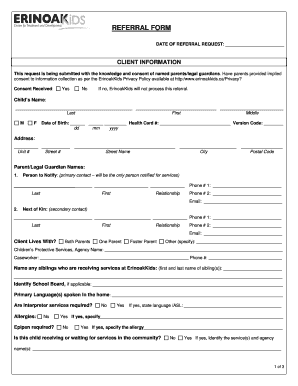
- Begin with the 'Client Information' section. Ensure parents or legal guardians have provided consent for information collection as per the ErinoakKids Privacy Policy. Indicate whether consent has been received by selecting 'Yes' or 'No'.
- Provide the child's name in the designated fields, ensuring you include their last, first, and middle names.
- Enter the child's date of birth in the 'Date of Birth' field, using the provided format (dd/mm/yyyy). Include the health card number and version code if applicable.
- Fill in the child's complete address, ensuring to include unit number (if applicable), street name, city, and postal code.
- List the names of the parent(s) or legal guardians, and specify the primary contact in the 'Person to Notify' section. Include their relationship to the child and contact information.
- Identify the secondary contact in the 'Next of Kin' section, along with their relationship and contact details.
- Indicate who the child lives with by selecting the appropriate option: both parents, one parent, foster parent, or other. If selecting 'other,' please specify.
- If applicable, provide detailed information about any siblings receiving services at ErinoakKids, the school board, and the primary languages spoken at home.
- Answer questions about allergies, required interpreter services, and whether the child is currently receiving or waiting for any community services.
- If any diagnosis or areas of concern are applicable, document this information accurately.
- Select the services being requested from ErinoakKids, ensuring to attach any relevant questionnaires as instructed.
- Complete the referral source information, including the name and contact details of the source.
- If medical referrals are required, fill in the physician's information and ensure all supporting documentation is included.
- After completing the form, review all entries for accuracy. You can then save changes, download, print, or share the form as necessary.
Take the next step in securing necessary services by completing the CLIENT INFORMATION form online today.
For technical assistance, please call the Technical Help Desk at 905-491-4442 (toll free 1-877-374-6625, extension 4442.)