Loading
Get Milog 17
How it works
-

Open form follow the instructions
-

Easily sign the form with your finger
-

Send filled & signed form or save
How to fill out the Milog 17 online
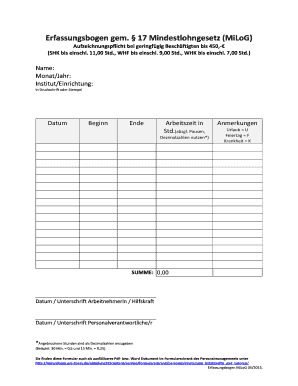
The Milog 17 form is essential for documenting work hours under the Minimum Wage Law for individuals engaged in minor employment. This guide provides a step-by-step approach to completing the form online, ensuring accuracy and compliance with legal requirements.
Follow the steps to successfully complete the Milog 17 form.
- Click the ‘Get Form’ button to access the Milog 17 form and open it in the designated editor.
- Provide the name of the institution or organization where you are employed, either by typing or using a stamp.
- Record the start time of work under the 'Beginn' section.
- Document the total working hours in the 'Arbeitszeit in Std.' field, ensuring to subtract break times.
- Add any relevant notes, using 'U' for vacation, 'F' for holidays, and 'K' for sickness in the designated 'Anmerkungen' section.
- Ensure that the total work hours are summed correctly in the 'SUMME' section, verifying your calculations.
- Have the responsible personnel sign and date the form for validation.
- After completing the form, save any changes you have made, and choose to download, print, or share the form as needed.
Complete your Milog 17 form online today to ensure your compliance with the Minimum Wage Law.