Loading
Get Designation Of Beneficiary For The Group Retirement Plan ...
How it works
-

Open form follow the instructions
-

Easily sign the form with your finger
-

Send filled & signed form or save
How to fill out the designation of beneficiary for the group retirement plan online
Filling out the designation of beneficiary form for the group retirement plan is an essential step in ensuring your retirement benefits are distributed according to your wishes. This guide will provide you with clear, step-by-step instructions to complete the form online, ensuring you understand each section and requirement.
Follow the steps to successfully fill out the form online.
- Click ‘Get Form’ button to obtain the form and open it in the editor.
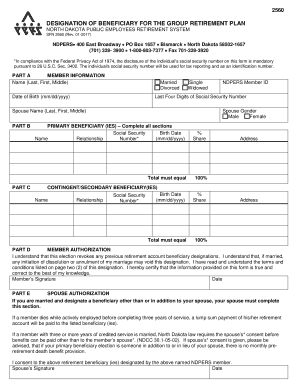
- In Part A, provide your member information. Fill in your name in the format of last, first, middle, and select your marital status (married, divorced, single, or widowed). Enter your date of birth in the specified format (mm/dd/yyyy) and the last four digits of your social security number. If applicable, include your spouse's name.
- In Part B, you will see the NDPERS member ID and a section for your spouse's gender. Select either male or female, as appropriate.
- Part C is for designating your primary beneficiary or beneficiaries. Complete all sections by providing the name, social security number, and birth date of each beneficiary, along with their relationship to you. Assign a percentage share for each beneficiary, ensuring the total equals 100%. Fill in the beneficiaries' addresses as well.
- Continue in Part C to designate contingent or secondary beneficiaries. Repeat the process of providing their names, relationships, social security numbers, birth dates, percentage shares, and addresses as previously detailed.
- In Part D, you must authorize the designation. Read the terms carefully, and then provide your signature and the date to confirm the information is accurate to the best of your knowledge.
- If applicable, in Part E, your spouse must consent if you are naming a beneficiary other than or in addition to them. They should fill out their information, sign, and date the section.
- After all sections are completed, review your entries for accuracy. Users can save changes, download, print, or share the completed form as required.
Complete your designation of beneficiary form online to ensure your retirement benefits are secured according to your wishes.
Write the names of the first beneficiary(ies) you would like to receive your benefit after you die. You may name an individual(s), entity (such as a charity, business, religious organization, funeral home, etc.), trust, or estate. You may name more than one.
Industry-leading security and compliance
US Legal Forms protects your data by complying with industry-specific security standards.
-
In businnes since 199725+ years providing professional legal documents.
-
Accredited businessGuarantees that a business meets BBB accreditation standards in the US and Canada.
-
Secured by BraintreeValidated Level 1 PCI DSS compliant payment gateway that accepts most major credit and debit card brands from across the globe.