Loading
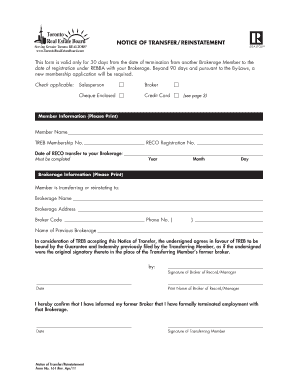
Get Treb Reinstatement Form
How it works
-

Open form follow the instructions
-

Easily sign the form with your finger
-

Send filled & signed form or save
How to fill out the Treb reinstatement form online
Filling out the Treb reinstatement form online can be straightforward with clear guidance. This guide will help you navigate the process step-by-step, ensuring that you complete each section accurately and efficiently.
Follow the steps to properly complete the Treb reinstatement form
- Press the ‘Get Form’ button to access the form and open it for editing.
- In the member information section, fill in your name, Treb membership number, and RECO registration number in the designated fields. Ensure you use accurate information for a smooth reinstatement process.
- Next, indicate the date of your RECO transfer to your new brokerage by selecting the year, month, and day. This information is crucial as it affects your membership timeline.
- In the brokerage information section, print the name of the brokerage you are transferring or reinstating to, along with the brokerage address. Remember to also include the brokerage code and phone number.
- You will need to reference your previous brokerage's name in the provided field. This ensures that all transitions are clearly documented.
- Review the statement regarding TREB’s acceptance of your transfer notice. By signing the form, you agree to be bound by the Guarantee and Indemnity previously filed by the transferring member.
- Sign the document as the broker of record or manager and provide their printed name along with the date.
- As the transferring member, confirm that you have informed your previous broker of your termination. Sign the agreement and include the date.
- After completing all sections, save your changes. You can then download, print, or share the form as needed.
Complete your Treb reinstatement form online today and ensure a smooth transition back to your brokerage.