Loading
Get Mysinfonia
How it works
-

Open form follow the instructions
-

Easily sign the form with your finger
-

Send filled & signed form or save
How to fill out the Mysinfonia online
Filling out the Mysinfonia form online is a straightforward process designed to ensure your volunteer or staff expenses are accurately documented and reimbursed. This guide provides clear, step-by-step instructions to help you navigate every section of the form effectively.
Follow the steps to complete your Mysinfonia form online.
- Press the ‘Get Form’ button to access the Mysinfonia form and open it in your preferred document editor.
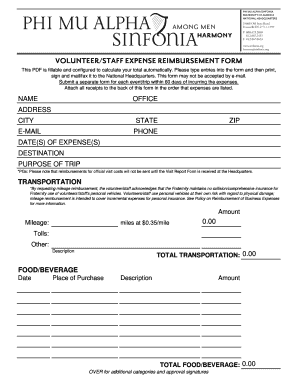
- In the first section, input your name, office, address, city, state, ZIP code, phone number, and email address. This information is essential for identifying you as the requester of reimbursement.
- Document the date(s) of the expenses, the destination of your trip, and the purpose of the trip succinctly in the designated fields.
- For the transportation section, indicate the method of transportation used. If claiming mileage, input the distance traveled in miles, which will be calculated at a rate of $0.35 per mile automatically. Record any tolls or other transportation expenses in the provided fields.
- In the food/beverage section, log the date of expense, name of the place where you purchased food or beverages, a brief description of the purchase, and the total amount spent.
- Continue to the hotel section, filling in the date of stay, the hotel name, the number of nights stayed, the rate per room, and the total amount incurred for hotel expenses.
- For supplies, enter the date of purchase, the place of purchase, a description of the materials bought, and the total cost in the respective fields.
- Any additional expenditures can be listed in the 'Other' section, following the same format as previous sections: date, place of purchase, description, and amount.
- Before submitting, check the GRAND TOTAL REIMBURSEMENT REQUESTED section to ensure all totals are accurate. Your form will sum all values from previous sections automatically.
- Complete the signature section by certifying the accuracy of your submitted expenses and signing the form. Ensure your supervisor approval is obtained if necessary.
- Save your changes, then print, sign, and send the form with receipts attached to the National Headquarters by mail or fax. Remember, email submissions may not be accepted.
Begin completing your Mysinfonia form online today to streamline your expense reimbursement process.
OUR MISSION. The Object of this Fraternity shall be for the development of the best and truest fraternal spirit; the mutual welfare and brotherhood of musical students; the advancement of music in America and a loyalty to the Alma Mater.
Industry-leading security and compliance
US Legal Forms protects your data by complying with industry-specific security standards.
-
In businnes since 199725+ years providing professional legal documents.
-
Accredited businessGuarantees that a business meets BBB accreditation standards in the US and Canada.
-
Secured by BraintreeValidated Level 1 PCI DSS compliant payment gateway that accepts most major credit and debit card brands from across the globe.