Loading
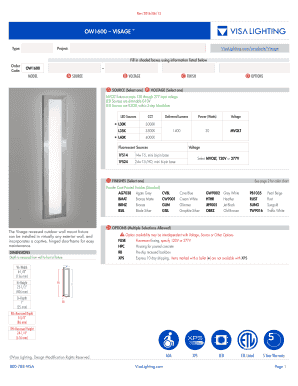
Get Ow1600 Visage - Visalighting.com
How it works
-

Open form follow the instructions
-

Easily sign the form with your finger
-

Send filled & signed form or save
How to fill out the OW1600 VISAGE - Visalighting.com online
Filling out the OW1600 VISAGE form is essential for ensuring you receive the correct lighting fixtures for your project. This guide provides clear, step-by-step instructions to help you complete the form accurately and efficiently.
Follow the steps to successfully complete the OW1600 VISAGE form.
- Press the ‘Get Form’ button to access the OW1600 VISAGE form. This action will open the document in your online editor, where you can begin entering your information.
- In the first section labeled ‘Order Code,’ enter 'OW1600' as your identifier for the specific product you are ordering.
- Next, navigate to the ‘Source’ field. Choose one option from the available LED or fluorescent sources to determine your fixture's input specifications.
- Proceed to the ‘Voltage’ section. Select either MVOLT, which is compatible with various input voltages, or specify between 120V or 277V based on your requirements.
- Fill in the ‘Finish’ section by selecting one of the available powder coat painted finishes. These options determine the final appearance of the fixture.
- In the ‘Options’ section, you can make multiple selections as needed. Review the choices and select any additional features such as fusing or express shipping.
- Once all the relevant information has been filled out, review your entries for accuracy. Make any required changes before finalizing.
- At this stage, you can save your changes, download the completed form, print it for your records, or share it with relevant stakeholders.
Complete your documentation online to ensure a smooth ordering process for your OW1600 VISAGE fixtures.