Loading
Get Equipment Service Request Form - Mwpower.pl
How it works
-

Open form follow the instructions
-

Easily sign the form with your finger
-

Send filled & signed form or save
How to fill out the EQUIPMENT SERVICE REQUEST FORM - Mwpower.pl online
Filling out the Equipment Service Request Form is a straightforward process that allows users to report service needs for their equipment. This guide provides step-by-step instructions to ensure accurate and efficient completion of the form.
Follow the steps to complete the form accurately.
- Press the 'Get Form' button to access the Equipment Service Request Form and open it in your editor.
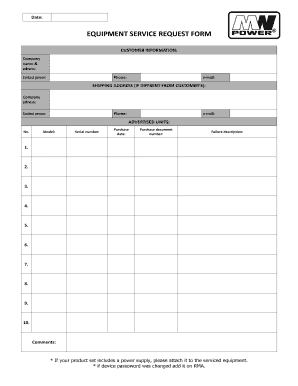
- Begin by providing your customer information in the designated sections. Enter your company name and address, followed by the contact person's name, phone number, and email address.
- If the shipping address differs from your customer address, fill out the shipping address section with the required details, including the company address, contact person's name, phone number, and email.
- In the advertised units section, enter the relevant equipment details. Start by indicating the unit number, model, serial number, and purchase date.
- Provide the purchase document number associated with the equipment in the specified field to ensure proper tracking and reference.
- Thoroughly describe the failure of the equipment. List each issue in the provided fields, using a bullet point format for clarity. Indicate up to ten different issues if applicable.
- Use the comments section to add any additional information or notes that might help in the service process.
- If applicable, make sure to attach the power supply for the product set you are sending for service, and include any previously changed device passwords in the RMA.
- After completing all fields, review the information for accuracy and completeness.
- Finally, save the changes, download the completed form, or print it for your records. You can also share the form as needed.
Take advantage of the convenience of online document management by completing your forms online today.