Loading
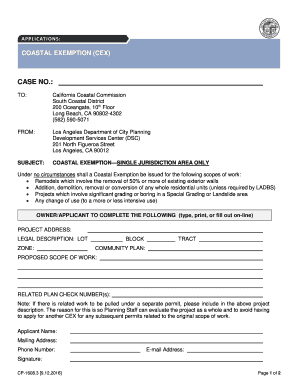
Get Coastal Exemption (cex)
How it works
-

Open form follow the instructions
-

Easily sign the form with your finger
-

Send filled & signed form or save
How to fill out the COASTAL EXEMPTION (CEX) online
Filling out the Coastal Exemption (CEX) online is a straightforward process that requires careful attention to detail. This guide will provide you with step-by-step instructions to ensure your application is complete and accurate.
Follow the steps to successfully complete the CEX form.
- Click ‘Get Form’ button to access the CEX form and open it in the designated online editor.
- Begin by entering the case number at the top of the form. Ensure that this number corresponds to your specific project for easy tracking.
- Next, input information for the address where the project will take place, followed by the legal description which includes the lot, zone, block, and tract details.
- Indicate the community plan associated with your project to provide context and ensure compliance with local regulations.
- Describe the proposed scope of work. Be detailed and clear about the project to help the review team understand your intentions.
- If there are related plan check numbers for the project, include them in the related plan check number(s) section. This is important for holistic project evaluation.
- Fill in the applicant's name, mailing address, phone number, and e-mail address. Make sure that this information is current as it will be essential for communication.
- Finally, provide your signature to certify that the information is accurate and submit the form. You can save changes, download, print, or share the form as needed.
Complete your COASTAL EXEMPTION (CEX) form online today for a smooth and efficient submission.
The City's Local Coastal Program (LCP) has two parts: An Implementation Plan (IP), which includes development standards and other ordinances relating to coastal access and coastal resource protection, and maps that delineate zoning districts within the Coastal Zone.