Loading
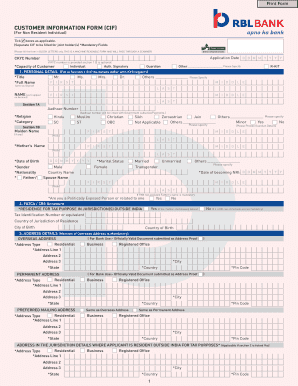
Get How To Know Cif Number Of Rbl Bank
How it works
-

Open form follow the instructions
-

Easily sign the form with your finger
-

Send filled & signed form or save
How to fill out the How To Know Cif Number Of Rbl Bank online
This guide provides clear instructions on how to fill out the How To Know Cif Number Of Rbl Bank form online. Following these steps will ensure you complete the form accurately, allowing you to obtain your Customer Information File (CIF) number with ease.
Follow the steps to successfully complete the form.
- Click 'Get Form' button to obtain the form and open it in the editor.
- Begin by entering the application date. Ensure this is today's date or the date when you are submitting the form.
- If you have a CKYC number, include it in the designated field. If not, you may skip section 1B.
- Complete section 1 by providing your personal details. Fill in your title, full name, date of birth, gender, nationality, and marital status as required.
- In section 2, provide details regarding your tax residency status. If you reside outside India, ensure to mention the Tax Identification Number and other relevant information.
- Fill in your address details in section 3. Ensure to provide both your overseas and permanent address along with the preferred mailing address.
- Complete section 4 by entering your contact details, including mobile number and email address for communications.
- In section 5, provide details of your KYC documents, including your identity document and proof of address.
- Complete the customer profiler in section 6, providing information on your educational qualification, employment type, occupation, and source of income.
- If you are applying on behalf of a minor, ensure to fill out section 8, providing guardian details where necessary.
- Review your entries for accuracy and completeness. Once all fields are correctly filled, proceed to sign the declaration in section 9.
- Finally, ensure to affix a recent passport-sized photo and provide your signature within the designated box.
- Once you have verified all information is accurate, save any changes, download a copy for your records, and share or submit the form as required.
Complete your document submission online and take the next step towards managing your RBL Bank account effectively.
Step 1: Visit the official website of the bank at .rblbank.com. Step 2: Redirect to the online banking portal at online.rblbank.com. Step 3: Click on 'Login' and then go to 'Personal Banking'. Step 4: Use your 16-digit credit card number as your User ID.
Industry-leading security and compliance
US Legal Forms protects your data by complying with industry-specific security standards.
-
In businnes since 199725+ years providing professional legal documents.
-
Accredited businessGuarantees that a business meets BBB accreditation standards in the US and Canada.
-
Secured by BraintreeValidated Level 1 PCI DSS compliant payment gateway that accepts most major credit and debit card brands from across the globe.