Loading
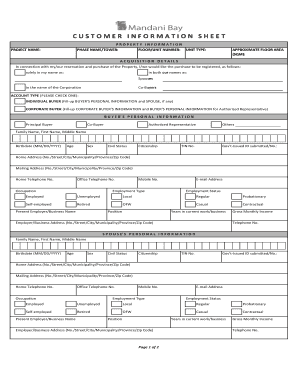
Get Customer Information Sheet - Mandani Bay
How it works
-

Open form follow the instructions
-

Easily sign the form with your finger
-

Send filled & signed form or save
How to fill out the Customer Information Sheet - Mandani Bay online
Completing the Customer Information Sheet - Mandani Bay online is an essential step in your property acquisition process. This guide provides a clear, step-by-step approach to ensure that you fill out the form accurately and efficiently.
Follow the steps to complete the Customer Information Sheet online.
- Press the ‘Get Form’ button to access the form and open it in your preferred editing tool.
- In the Property Information section, enter the Project Name, Phase Name/Tower, Floor/Unit Number, Unit Type, and Approximate Floor Area (in square meters). Ensure that all details are accurate to avoid processing delays.
- In the Acquisition Details section, indicate how you would like the purchase to be registered by selecting one of the options provided. This will determine how the property title is held.
- Choose the Account Type by checking either the Individual Buyer or Corporate Buyer option and fill in the necessary information for the Buyer’s Personal Information or Corporate Buyer’s Information as applicable.
- Complete the Buyer’s Personal Information section. Indicate if you are the Principal Buyer, Co-Buyer, Authorized Representative, or other roles as required. Fill in your Family Name, First Name, Middle Name, Birthdate, Age, Sex, Civil Status, Citizenship, Tax Identification Number (TIN), and Government-Issued ID details.
- Provide your Home Address and Mailing Address accurately, including all components such as No./Street/City/Municipality/Province/Zip Code. Make sure your contact details are current.
- Fill in your Home Telephone No., Office Telephone No., Occupation, Mobile No., Employment Type, Employment Status, Present Employer/Business Name, Position, Years in Current Work/Business, Employer/Business Address, and Gross Monthly Income as required.
- If applicable, repeat the process for the Spouse’s Personal Information, including all fields similar to the Buyer’s personal details.
- For Corporate Buyer’s Information, fill in the necessary details such as Company Name, Office Telephone No., Office Address, Nature of Business, TIN, Email Address, and Website Address.
- Indicate your Source of Sale by selecting from the list provided, and specify the Purpose of Purchase by checking the relevant box.
- Review all information for accuracy before submission. Once checked, sign over your printed name and date in the Buyer Conformity section. If you have a spouse or partner, a signature is required there as well.
- After filling out all sections correctly, you can save changes, download, print, or share the completed form as needed.
Complete your Customer Information Sheet - Mandani Bay online today to ensure a smooth property acquisition process.
As of May 2023, Mandani Bay is in an advanced stage of construction. The development encompasses a sprawling 20-hectare area, transforming the waterfront into a vibrant lifestyle destination. With its prime location and stunning views, Mandani Bay aims to create a world-class living, working, and leisure environment.