Loading
Get Formulario Para Solicitud De Usuarios Del Sepp
How it works
-

Open form follow the instructions
-

Easily sign the form with your finger
-

Send filled & signed form or save
How to fill out the Formulario Para Solicitud De Usuarios Del Sepp online
Filling out the Formulario Para Solicitud De Usuarios Del Sepp online is a straightforward process that requires attention to detail. This guide will help you navigate each section of the form efficiently, ensuring you provide all the necessary information accurately.
Follow the steps to successfully complete the form online.
- Press the ‘Get Form’ button to access the form, which will then open in your preferred editing environment.
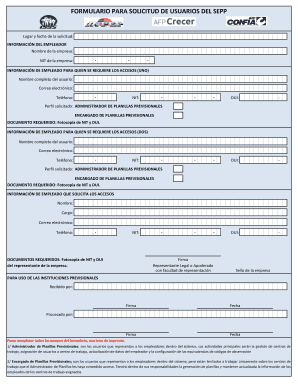
- Enter the requested information in the 'Lugar y fecha de la solicitud' section, including the location and date of your application.
- Provide employer information: Fill in the 'Nombre de la empresa' and 'NIT de la empresa' fields with the official name and tax identification number of your company.
- For the first user access request, input the 'INFORMACIÓN DE EMPLEADO PARA QUIEN SE REQUIERE LOS ACCESOS (UNO)': Include the full name, email address, phone number, 'NIT', and 'DUI' of the employee needing access.
- Select the profile being requested for the first employee: Choose either 'Administrador de Planillas Previsionales' or 'Encargado de Planillas Previsionales' as required.
- Remember to attach a copy of both the NIT and DUI for this employee in the designated document submission section.
- Repeat steps 4 to 6 for any additional user access requests under 'INFORMACIÓN DE EMPLEADO PARA QUIEN SE REQUIERE LOS ACCESOS (DOS)', ensuring to input all relevant details accurately.
- Complete the 'INFORMACIÓN DE EMPLEADO QUE SOLICITA LOS ACCESOS' section by entering your information, including name, position, email address, phone number, and NIT.
- Attach required documents: Ensure a photocopy of the NIT and DUI of the company representative is included as required.
- Complete the 'Firma' section by having the legal representative or authorized person sign, and include the company seal if necessary.
- Review all filled sections for accuracy before saving your changes. Once completed, you may download, print, or share the form as needed.
Complete your form online now to streamline the process and ensure your request is submitted correctly.
“SEPP”, es el SISTEMA PARA LA ELABORACIÓN DE PLANILLAS PREVISIONALES; el cual nace como respuesta a las necesidades de los empleadores de contar con un sistema fácil de utilizar, amigable y que les permita elaborar las planillas de cotizaciones previsionales de una manera más expedita y sin complicaciones.