Loading
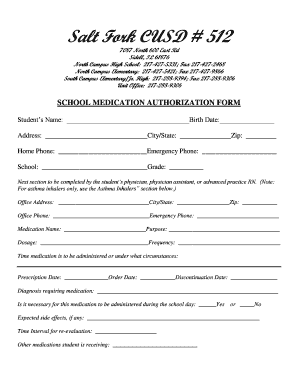
Get Medication Authorization 16-17 - Salt Fork Cusd #512 - Saltfork K12 Il
How it works
-

Open form follow the instructions
-

Easily sign the form with your finger
-

Send filled & signed form or save
How to fill out the Medication Authorization 16-17 - Salt Fork CUSD #512 - Saltfork K12 Il online
Completing the Medication Authorization form online is a straightforward process that ensures your child's medical needs are met while in school. This guide provides you with clear instructions on how to navigate the form with ease.
Follow the steps to accurately complete the Medication Authorization form online.
- Click ‘Get Form’ button to obtain the form and open it in the editor.
- Begin by entering the student's name and birth date in the designated fields. Ensure that the name is spelled correctly and that the birth date is formatted as required.
- Fill in the student's address, city/state, and zip code accurately to prevent any communication issues.
- Provide the home phone number and an emergency phone number for immediate contact if needed.
- Select the school the student attends and enter their current grade in the appropriate fields.
- Next, the parent or guardian should have the student's physician, physician assistant, or advanced practice RN complete the section that includes office address, phone numbers, and necessary medication information.
- In this section, provide the medication name, purpose, dosage, and frequency, along with the specific times the medication should be administered.
- Indicate the prescription date, order date, and any discontinuation date for the medication. Additionally, provide a diagnosis requiring medication.
- Clearly indicate if it is necessary for the medication to be administered during the school day by selecting 'Yes' or 'No.'
- Document any expected side effects and any other medications the student is currently receiving to ensure comprehensive care.
- If the student uses an asthma inhaler, attach the prescription label as required.
- Authorize the administration of common medications at school by checking the appropriate boxes next to the medications you consent for the school to administer.
- Conclude by entering the physician's name, signing, and dating the authorization to confirm that all information is correct.
- Once all fields are completed, save changes to retain the information. You can then download, print, or share the completed form as needed.
Complete your forms online today to ensure your child's health needs are met at school.
District Name: Salt Fork CUSD 512 schools for this districtNCES District ID: 1701418 Mailing Address: 701 1/2 W Vermilion St Catlin, IL 61817-9781 Physical Address: 701 1/2 W Vermilion St Catlin, IL 61817-9781 Type: Regular local school district Status: Open4 more rows
Industry-leading security and compliance
US Legal Forms protects your data by complying with industry-specific security standards.
-
In businnes since 199725+ years providing professional legal documents.
-
Accredited businessGuarantees that a business meets BBB accreditation standards in the US and Canada.
-
Secured by BraintreeValidated Level 1 PCI DSS compliant payment gateway that accepts most major credit and debit card brands from across the globe.