Loading
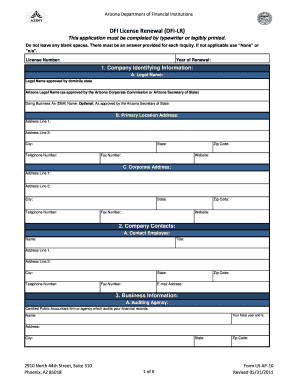
Get Az Al-ap-10 2011-2026
How it works
-

Open form follow the instructions
-

Easily sign the form with your finger
-

Send filled & signed form or save
How to use or fill out the AZ AL-AP-10 online
Filling out the AZ AL-AP-10 online can seem challenging, but with clear guidance, you can complete it efficiently. This step-by-step guide will help you navigate each section of the renewal application and ensure you provide the required information accurately.
Follow the steps to fill out the AZ AL-AP-10 form effectively.
- Press the ‘Get Form’ button to access the AZ AL-AP-10 form and open it in your preferred document editor.
- Fill out the license number and the year of renewal at the designated top section of the form to clearly identify your application.
- Complete the Company Identifying Information section by providing the legal name, primary location address, and any 'Doing Business As' (DBA) name if applicable. Make sure to include your contact details such as telephone number and website.
- In the Company Contacts section, list a contact employee along with their title and address details. Ensure you include valid phone and email information.
- Provide details of your auditing agency in the Business Information section, including the name of the agency and their contact address. Do not forget to specify your fiscal year end.
- If you are renewing Arizona branches, list all associated locations along with the designated branch managers' contact details. Be sure to omit your primary office location.
- Answer the Disclosures section thoroughly. If any responses are 'YES', prepare an attachment with complete details for further clarification needed by the review board.
- Confirm whether any Changes to Your Licenses have occurred since the last renewal. If applicable, ensure necessary documents are submitted separately from the renewal application.
- Complete the Affidavit section, ensuring that it is signed by an owner or officer on file. Make sure to have it notarized.
- Review your application for completeness. Save the completed form, download a copy for your records, and prepare for printing or sharing if necessary.
Complete your AZ AL-AP-10 renewal application online today and ensure compliance with the Arizona Department of Financial Institutions.
In Arizona, services such as telecommunications, utility services, and certain amusement businesses are subject to the transaction privilege tax (TPT). However, exemptions exist, so it is essential to evaluate your specific business activities. You can leverage resources from AZ AL-AP-10 to assess whether your services fall under TPT.