Loading
Get Fin501
How it works
-

Open form follow the instructions
-

Easily sign the form with your finger
-

Send filled & signed form or save
How to fill out the Fin501 online
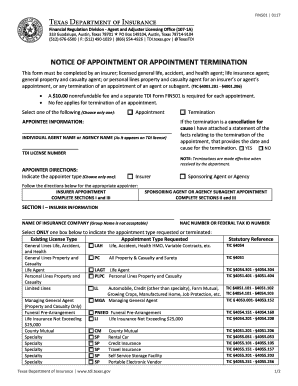
Filling out the Fin501 form is an essential step for insurers and agents when managing appointments and terminations. This guide provides clear, step-by-step instructions to help users complete this form accurately and efficiently.
Follow the steps to complete the Fin501 online
- Click the ‘Get Form’ button to access the form and open it in your chosen editor.
- Select whether you are completing the form for an appointment or a termination. Choose only one option.
- For appointment requests, fill in the appointee information, including the individual agent's name or agency name as it appears on the license, and the corresponding TDI license number.
- If terminating an appointment, indicate if this is a cancellation for cause by attaching a statement detailing the reasons for the termination along with the date.
- Choose the appointer's type, either 'Insurer' or 'Sponsoring Agent or Agency,' and complete the relevant sections based on your choice.
- If you are completing Section I, provide the name of the insurance company, including the NAIC number or federal tax ID number, and select the appropriate appointment type requested.
- If you are completing Section II for a sponsoring agent or agency, include the sponsoring agent's name or agency name and TDI license number. Indicate the authorized lines for the subagent appointment.
- Complete Section III by providing the mailing address, email address, printed name, and signature of the authorized representative. Make sure the date is included.
- After filling out the form, review all entries for accuracy. Save changes if needed, then download or print the form for your records.
- Submit the completed Fin501 form to the Texas Department of Insurance using the appropriate mailing address.
Complete your Fin501 form online today to ensure efficient processing of appointments and terminations.
Get form
Experience a faster way to fill out and sign forms on the web. Access the most extensive library of templates available.
Get This Form Now!
Use professional pre-built templates to fill in and sign documents online faster. Get access to thousands of forms.