Loading
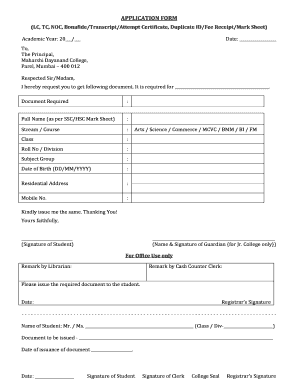
Get (lc, Tc, Noc, Bonafide/transcript/attempt Certificate ... - Mdcollege
How it works
-

Open form follow the instructions
-

Easily sign the form with your finger
-

Send filled & signed form or save
How to fill out the (LC, TC, NOC, Bonafide/Transcript/Attempt Certificate) online
This guide provides detailed instructions on how to accurately fill out the application form for LC, TC, NOC, Bonafide/Transcript/Attempt Certificate at Maharshi Dayanand College. Follow these steps to ensure your application is completed correctly and efficiently.
Follow the steps to successfully complete your application form.
- Select the 'Get Form' button to access the application form and open it in the editing interface.
- Fill in the academic year by entering the appropriate year in the 'Academic Year' field provided.
- Write today's date in the designated date field.
- Address the application to 'The Principal' of Maharshi Dayanand College.
- In the request section, briefly mention the purpose of the required document.
- Complete the 'Document Required' section by indicating the exact document you are requesting.
- Provide your full name exactly as it appears on your SSC/HSC mark sheet in the designated field.
- Indicate your stream or course, such as Arts, Science, or Commerce.
- Specify your class and roll number/division in the relevant fields.
- Indicate your subject group clearly.
- Enter your date of birth in the format DD/MM/YYYY.
- Fill in your residential address fully.
- Provide a mobile number for contact purposes.
- Indicate your stream (Arts/Science/Commerce/MCVC/BMM/BI/FM) again.
- Conclude your application with 'Thanking You!' followed by your signature in the provided box.
- For junior college applicants, ensure the guardian's name and signature are included in the specified section.
- Submit the form, then the office staff will review and include their remarks accordingly.
- Finally, after processing, you will receive the document with the registration details, including the date of issuance, signature of the clerk, and college seal.
Complete your application form online for a faster response.