Loading
Get Amazon
How it works
-

Open form follow the instructions
-

Easily sign the form with your finger
-

Send filled & signed form or save
How to fill out the Amazon online
This guide provides essential steps to effectively fill out the Amazon online form, ensuring you understand each component clearly. With straightforward instructions, you will navigate the form confidently and accurately.
Follow the steps to complete your Amazon form online.
- Press the ‘Get Form’ button to access the document and open it in your chosen editor.
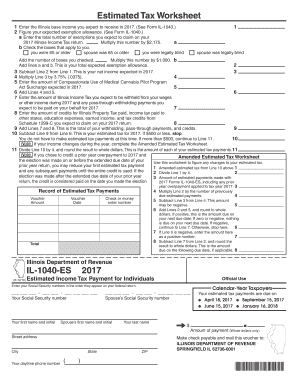
- Begin by entering your expected Illinois base income for the year in the first field. Refer to Form IL-1040 if you need guidance on what to include.
- Calculate your anticipated exemption allowance. Enter the total number of exemptions you expect to claim on your 2017 Illinois Income Tax return in the designated field. Multiply this number by $2,175.
- Next, check any applicable boxes indicating if you or your partner are 65 or older or legally blind. Add the total number of checked boxes for line b and multiply this by $1,000.
- Add the results from lines a and b to determine your total expected exemption allowance, which you will record on line 2.
- Subtract the total expected exemption allowance from your expected income to find your net income for the year, and write this on line 3.
- Multiply your net income amount from line 3 by 3.75% (.0375) to calculate your estimated tax amount and enter that value on line 4.
- Enter the expected amount of any surcharges related to the Compassionate Use of Medical Cannabis Pilot Program on line 5.
- Add the results of lines 4 and 5 together and place the total on line 6.
- Indicate the expected amount of Illinois Income Tax that will be withheld from your income during the year on line 7.
- Enter your anticipated credits (such as for property tax, income tax paid to other states, etc.) on line 8.
- Add the values from lines 7 and 8 to get the total of your withholding and credits, which you will write on line 9.
- Subtract the total from line 9 from the total from line 6 to find your estimated tax for 2017, which you will enter on line 10. If this value is $500 or less, you do not need to make estimated tax payments at this time.
- If your estimated tax exceeds $500, divide the amount on line 10 by 4 to determine your estimated tax payments for each quarter and write this on line 11.
- Finally, review all entered information for accuracy, and once verified, save your changes, download, print, or share the completed form as needed.
Start filling out your Amazon form online today for seamless tax preparation.