Loading
Get Ca Form 5806 Instructions 2019
How it works
-

Open form follow the instructions
-

Easily sign the form with your finger
-

Send filled & signed form or save
How to fill out the Ca Form 5806 Instructions 2019 online
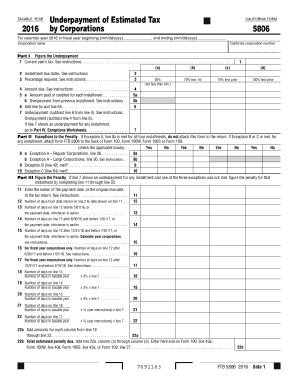
This guide provides comprehensive, user-friendly instructions for completing the Ca Form 5806 online. Whether you are familiar with tax forms or new to this process, this step-by-step guide will ensure that you fill out the form accurately and efficiently.
Follow the steps to successfully complete the Ca Form 5806 online.
- Press the ‘Get Form’ button to obtain the form and open it in the editor.
- Begin by entering the tax year at the top of the form. Indicate whether it is for the calendar year 2016 or a specific fiscal year by filling in the start and end dates.
- Next, provide your corporation’s name and California corporation number in the designated fields.
- In Part I, outline the computation for the underpayment of estimated tax. Start with the current year's tax, and refer to the corresponding instructions as needed.
- Document the installment due dates in Part II, and indicate whether you meet any of the exceptions by checking the appropriate boxes.
- Continue filling out the penalty section if applicable. Complete all required fields including payment dates and number of days related to each installment.
- If any exceptions apply, confirm this by marking the relevant boxes in Part IV. Follow the calculations provided to determine if the exception is met.
- Once you have completed all sections, review your entries for accuracy. You can then save your changes, download, print, or share the completed form, ensuring you maintain a copy for your records.
Start filling out your Ca Form 5806 online today to ensure the timely and accurate completion of your tax obligations.
Generally, you must make estimated tax payments if you expect to owe at least $500 ($250 if married/RDP filing separately) in tax for 2022 (after subtracting withholding and credits) and you expect your withholding and credits to be less than the smaller of: 90% of the tax shown on your 2022 tax return; or.