Loading
Get Bsog Membership
How it works
-

Open form follow the instructions
-

Easily sign the form with your finger
-

Send filled & signed form or save
How to fill out the Bsog Membership online
Completing the Bsog Membership form online is a straightforward process that requires careful attention to detail. This guide will walk you through each section of the form to ensure a smooth registration experience.
Follow the steps to successfully complete the Bsog Membership form.
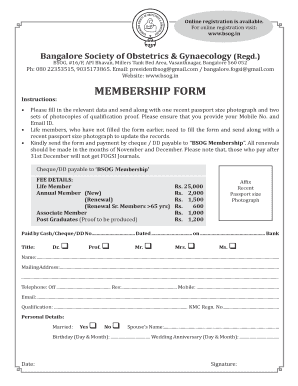
- Click ‘Get Form’ button to obtain the form and open it in the editor.
- Begin by filling in your title at the top of the form. Select the appropriate title from the options provided, such as Dr., Prof., Mr., Mrs., or Ms.
- Next, enter your full name in the designated field. Ensure that your name matches any legal documentation for verification purposes.
- Provide your mailing address in the specified area. Include all necessary details to ensure proper correspondence.
- Fill in your telephone numbers. You’ll need to provide an office number, a residence number, and your mobile number. It’s critical to input accurate data to maintain communication.
- Enter your email address carefully. This will be important for future communications and updates regarding your membership.
- Complete the qualification field by detailing your educational background. Also, include your KMC registration number if relevant.
- In the personal details section, indicate your marital status by selecting 'Yes' or 'No'. If married, provide your spouse’s name.
- Record important dates, including your birthday and wedding anniversary, in the specified format.
- Affix a recent passport-sized photograph in the designated area, ensuring it meets identification standards.
- Once all fields are completed, review your entries for accuracy. Any mistakes may cause delays in processing your application.
- Save your changes in the online form. After saving, you may choose to download, print, or share the filled-out form as required.
Start completing the Bsog Membership application online today for a seamless experience.
Bangalore Society of Obstetrics & Gynaecology (Regd.) Toggle navigation. About BSOG.
Industry-leading security and compliance
US Legal Forms protects your data by complying with industry-specific security standards.
-
In businnes since 199725+ years providing professional legal documents.
-
Accredited businessGuarantees that a business meets BBB accreditation standards in the US and Canada.
-
Secured by BraintreeValidated Level 1 PCI DSS compliant payment gateway that accepts most major credit and debit card brands from across the globe.