Loading
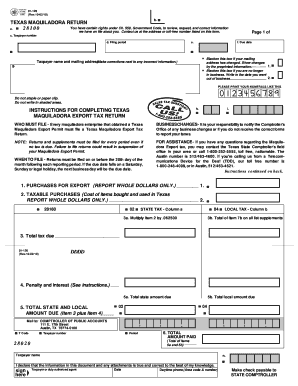
Get Texas Maquiladora Return
How it works
-

Open form follow the instructions
-

Easily sign the form with your finger
-

Send filled & signed form or save
How to fill out the Texas Maquiladora Return online
This guide provides clear, user-friendly instructions on completing the Texas Maquiladora Return online. Whether you’re familiar with tax forms or not, our step-by-step approach will help you navigate the process with confidence.
Follow the steps to complete your Texas Maquiladora Return online.
- Press the ‘Get Form’ button to access the Texas Maquiladora Return form and open it for completion.
- Fill in your taxpayer number in the designated field. This is essential for identifying your return.
- Enter the filing period by specifying the last month, last day of the month, and year. For example, for the first quarter of 2023, input 'Quarter Ending 03-31-23'.
- Provide the due date for the tax return. Returns must be filed by the 20th day of the month following the reporting period.
- If your mailing address has changed, blacken the appropriate box and make any necessary corrections next to the preprinted information.
- If you are no longer in business, blacken the corresponding box and write the date you ceased operations.
- Input your taxpayer name and mailing address in the specified section. Ensure any incorrect information is corrected.
- Report the total amount of all purchases for export made during the reporting period in Item 1. Only whole dollars are accepted.
- In Item 2, report any taxable purchases you made for your use in Texas during this period. Again, only whole dollars are allowed.
- Calculate total tax due by following the guidance on Items 5a and 5b, ensuring to consider any penalties or interest if applicable.
- Finally, you can save your changes, download a completed copy, print the form, or share it as needed.
Complete your Texas Maquiladora Return online today to ensure compliance and avoid any penalties.
For monthly filers, reports are due on the 20th of the month following the reporting month. For example, the April sales tax report is due May 20. For yearly filers, reports of sales for the previous year are due on Jan. 20.