Loading
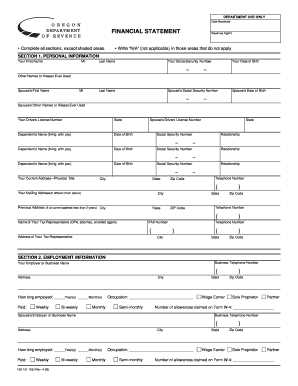
Get Financial Statement, 150-101-159
How it works
-

Open form follow the instructions
-

Easily sign the form with your finger
-

Send filled & signed form or save
How to fill out the Financial Statement, 150-101-159 online
Filling out the Financial Statement, 150-101-159, is an essential step in providing an overview of your financial situation to the Oregon Department of Revenue. This guide will walk you through each section of the form, ensuring that you complete it accurately and comprehensively.
Follow the steps to complete the Financial Statement online.
- Press the ‘Get Form’ button to access the Financial Statement and open it in your preferred editor.
- Begin with Section 1, Personal Information. Fill in your first name, middle initial, last name, social security number, date of birth, and any other names or aliases you have used. Provide your spouse’s information in the same format.
- In Section 1, continue by entering your and your spouse's driver’s license number, current physical address, mailing address (if different), and contact information. This ensures that the Department of Revenue can reach you if needed.
- Move to Section 2, Employment Information. Provide details about your employer or business name, address, and the length of your employment. Fill in your occupation and pay frequency. If self-employed, list the responsible owners or partners and circle their applicable responsibilities.
- In Section 3, General Financial Information, list your bank accounts, vehicles, life insurance, and securities. Attach copies of bank statements. Make sure to include current market values and payoff amounts where applicable.
- Continue in Section 3 by detailing your safe deposit boxes, real property, credit cards, and any other valuable assets. Remember to include an additional page if needed and maintain accuracy with current market values.
- For Section 4, Assets and Liability Analysis, summarize your immediate assets and calculate total assets by adding equity from real property and immediate assets.
- Section 5 focuses on Monthly Income and Expense Analysis. Include all forms of income and verify personal and business expenses. Calculate your net disposable income by subtracting total personal expenses from total income.
- In Section 6, provide any additional information relevant to your financial situation that hasn't been captured in previous sections. Attach extra pages if necessary.
- Finally, in Section 7, authorize the disclosure of information by signing and dating the form. Your spouse must sign as well if submitted jointly.
- Once completed, ensure all information is accurate. Save your changes, and you can download or print the form for submission.
Take the first step in managing your finances by completing the Financial Statement online today.
There are four main financial statements. They are: (1) balance sheets; (2) income statements; (3) cash flow statements; and (4) statements of shareholders' equity. Balance sheets show what a company owns and what it owes at a fixed point in time.
Industry-leading security and compliance
US Legal Forms protects your data by complying with industry-specific security standards.
-
In businnes since 199725+ years providing professional legal documents.
-
Accredited businessGuarantees that a business meets BBB accreditation standards in the US and Canada.
-
Secured by BraintreeValidated Level 1 PCI DSS compliant payment gateway that accepts most major credit and debit card brands from across the globe.