Loading
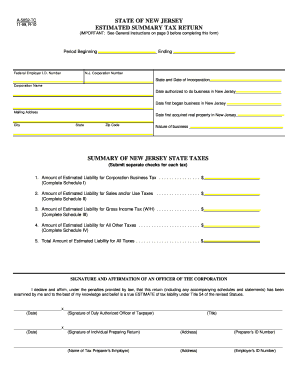
Get A-5052 State Of New Jersey Estimated Summary Tax Return, Form A-5052
How it works
-

Open form follow the instructions
-

Easily sign the form with your finger
-

Send filled & signed form or save
How to fill out the A-5052 State Of New Jersey Estimated Summary Tax Return, Form A-5052 online
Filling out the A-5052 State Of New Jersey Estimated Summary Tax Return online can streamline the process of reporting your estimated tax liabilities. This guide provides clear, step-by-step instructions for each section of the form, ensuring that users of all experience levels can complete it accurately and efficiently.
Follow the steps to successfully complete your Estimated Summary Tax Return.
- Press the ‘Get Form’ button to obtain the form and open it in your selected editing tool.
- Fill in the period of the tax liability by entering the beginning and ending dates in the designated fields.
- Complete the required identification fields including your Federal Employer Identification Number, New Jersey Corporation Number, state and date of incorporation, and corporation name.
- Indicate the date authorized to do business in New Jersey and the date you first began doing business in the state.
- Provide your mailing address, city, state, and zip code.
- Declare the nature of your business in the appropriate field.
- In the summary of New Jersey state taxes section, complete each line that applies to your estimated tax liabilities, referencing the appropriate schedules (I, II, III, IV) for calculations.
- For each schedule, enter the required amounts based on calculations which may include adjusted net income, tax base, and estimated taxes.
- Sign and affirm the form by providing the signature of a duly authorized officer of the corporation along with their title and date.
- If applicable, have the individual preparing the return provide their signature, prep ID number, employer's name, and address.
- Once all sections are completed, review the entire form for accuracy, then save your changes, download, print, or share the completed form as needed.
Complete your A-5052 State Of New Jersey Estimated Summary Tax Return online to ensure you meet your filing obligations efficiently.
Corporations ending business in New Jersey can dissolve, cancel, or withdraw online. Go to njportal.com/dor/annualreports and select “Close a Business.” Businesses that choose to complete a paper application must submit all of the following: Appropriate dissolution/withdrawal/cancellation form.
Industry-leading security and compliance
US Legal Forms protects your data by complying with industry-specific security standards.
-
In businnes since 199725+ years providing professional legal documents.
-
Accredited businessGuarantees that a business meets BBB accreditation standards in the US and Canada.
-
Secured by BraintreeValidated Level 1 PCI DSS compliant payment gateway that accepts most major credit and debit card brands from across the globe.