Loading
Get Mott Community College Transcripts
How it works
-

Open form follow the instructions
-

Easily sign the form with your finger
-

Send filled & signed form or save
How to fill out the Mott Community College transcripts online
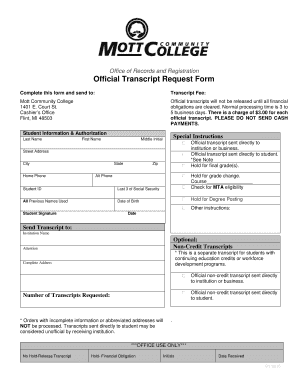
This guide provides clear, step-by-step instructions for completing the Mott Community College transcripts online. Whether you are applying for your official transcript or seeking additional non-credit options, this guide aims to support you in navigating the process efficiently.
Follow the steps to fill out the transcript request form.
- Click ‘Get Form’ button to access the official transcript request form and open it in the editor.
- Begin by filling out your personal information in the 'Student Information & Authorization' section. Include your last name, first name, middle initial, street address, city, state, zip code, home phone number, alternate phone number, student ID, the last three digits of your social security number, all previous names used, and date of birth.
- Sign the document in the 'Student Signature' field and include the date of signing to authorize the request.
- Next, indicate where you would like the transcript to be sent. In the 'Send Transcript to' section, enter the institution name, attention (if applicable), and complete address.
- Specify the number of transcripts requested in the designated field.
- Review the options for special instructions related to your transcript request, including sending it directly to an institution or student, holding for final grades, holding for a grade change, or checking for MTA eligibility.
- If applicable, fill out any optional non-credit transcript requests according to the provided details.
- Ensure all fields are filled accurately before submitting. Review your information to prevent any delays.
- Once you have completed the form, save your changes, then download, print, or share the form as needed before submission.
Start filling out your Mott Community College transcript request form online now.
Gadsden State students can print unofficial transcripts through OneACCS* If you are a currently enrolled student, login to OneACCS here. Once you are logged in, choose Unofficial Transcript. From the drop down menu, click Undergraduate. From the drop down menu, click Unofficial Web Transcript.
Industry-leading security and compliance
US Legal Forms protects your data by complying with industry-specific security standards.
-
In businnes since 199725+ years providing professional legal documents.
-
Accredited businessGuarantees that a business meets BBB accreditation standards in the US and Canada.
-
Secured by BraintreeValidated Level 1 PCI DSS compliant payment gateway that accepts most major credit and debit card brands from across the globe.