Loading
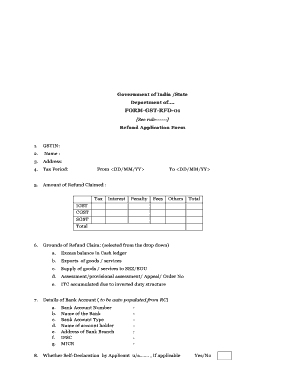
Get Form -gst -rfd -01 - Onlinelawsolutions.com
How it works
-

Open form follow the instructions
-

Easily sign the form with your finger
-

Send filled & signed form or save
How to fill out the FORM -GST -RFD -01 online
This guide provides a comprehensive overview of filling out the FORM -GST -RFD -01, a crucial document for applying for a refund related to Goods and Services Tax. Whether you are new to digital document management or have some experience, this step-by-step approach will make the process straightforward and user-friendly.
Follow the steps to complete your refund application.
- Click the ‘Get Form’ button to download the refund application form and open it in your preferred document editor.
- Enter your GSTIN (Goods and Services Tax Identification Number) in the first field to identify your tax registration.
- Provide your name in the next field, ensuring it matches the name associated with your GSTIN.
- Fill in your address, ensuring accuracy to facilitate any necessary communication regarding your refund.
- Indicate the tax period for which you are claiming the refund by filling in the start date and end date in the formats <DD/MM/YY>.
- List the amount of refund claimed by entering values for tax, interest, penalty, fees, and others in the provided fields. Ensure to sum these up in the total section.
- Select the grounds for your refund claim from the dropdown list, which includes options such as excess balance in cash ledger and exports of goods/services.
- Verify the details of your bank account, which should auto-populate according to the registered details. Ensure the information is correct.
- Indicate whether you are providing a self-declaration by selecting 'Yes' or 'No.' Complete the self-declaration section as applicable.
- Fill in the verification section by affirming that the information provided is accurate to the best of your knowledge, including your name and designation.
- After reviewing all sections for accuracy, you can save your changes. Then, proceed to download, print, or share the form as required.
Start the process of filing your REFUND application online today!