Loading
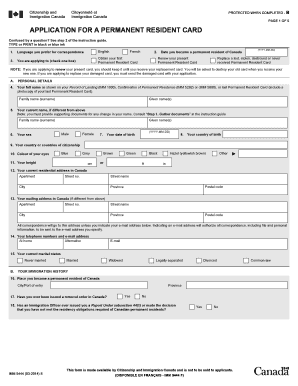
Get Canada Imm 5444 E 2014
How it works
-

Open form follow the instructions
-

Easily sign the form with your finger
-

Send filled & signed form or save
How to fill out the Canada IMM 5444 E online
Filling out the Canada IMM 5444 E form is a crucial step for individuals applying for a Permanent Resident Card. This guide provides clear, step-by-step instructions to assist users in completing the form accurately and efficiently online.
Follow the steps to fill out the Canada IMM 5444 E online effectively.
- Click the ‘Get Form’ button to obtain the form and open it in the editor.
- Indicate your preferred language for correspondence by selecting either English or French.
- Choose the purpose of your application by checking the appropriate box, such as obtaining your first Permanent Resident Card, renewing an existing card, or replacing a lost card.
- Enter the date you became a permanent resident of Canada using the YYYY-MM-DD format.
- Fill out your personal details, including your full name, which should match your Record of Landing or last Permanent Resident Card.
- If applicable, provide your current name if it differs from the previous entry, along with supporting documents for any name change.
- Select your sex by marking either Male or Female.
- Input your date of birth in the specified format.
- List your country of birth and your country or countries of citizenship.
- Indicate the color of your eyes and your height in centimeters and feet/inches.
- Provide your current residential address in Canada, ensuring all information is complete.
- If your mailing address is different from your residential address, fill that in accordingly.
- Include your telephone numbers and email address. Indicate your preference for correspondence.
- Select your current marital status from the available options.
- Provide details of where you became a permanent resident of Canada.
- Answer the questions about your immigration history, including any removal orders or residency obligation reports.
- Fill out your address history for the past five years, or since becoming a permanent resident.
- Document your work and/or educational history for the same timeframe.
- List any travel outside Canada in the last five years.
- If applicable, complete the residency obligation section detailing absences from Canada.
- Provide consent to disclose your history of entries into Canada by selecting 'YES'.
- Read and acknowledge the declaration section, ensuring the accuracy and completeness of your information.
- If applicable, fill out the solemn declaration concerning a lost, stolen, destroyed or never received Permanent Resident Card.
- Review your application thoroughly, and once all sections are complete, you can save changes, download, print, or share the form.
Begin your online application for the Canada IMM 5444 E form today.
Get form
Experience a faster way to fill out and sign forms on the web. Access the most extensive library of templates available.
You can acquire a Canadian declaration form from official immigration websites or legal document platforms. These forms are crucial for your immigration process and ensure compliance with Canadian regulations. For additional support with Canada IMM 5444 E, visiting uslegalforms can provide you with easy access to the necessary resources and forms tailored for your needs.
Get This Form Now!
Use professional pre-built templates to fill in and sign documents online faster. Get access to thousands of forms.